> ## Documentation Index
> Fetch the complete documentation index at: https://help.hiredata.com/llms.txt
> Use this file to discover all available pages before exploring further.
# Allow Carerix cookies in your browser
> Fix Carerix Marketplace SSO login screens, loops, or blank panels by allowing the cross-site cookies required by embedded integrations such as HireData.
If you see a Carerix login screen inside the HireData RMA while you are already signed in to Carerix, your browser is probably blocking the cross-site cookies that Carerix Marketplace SSO needs.
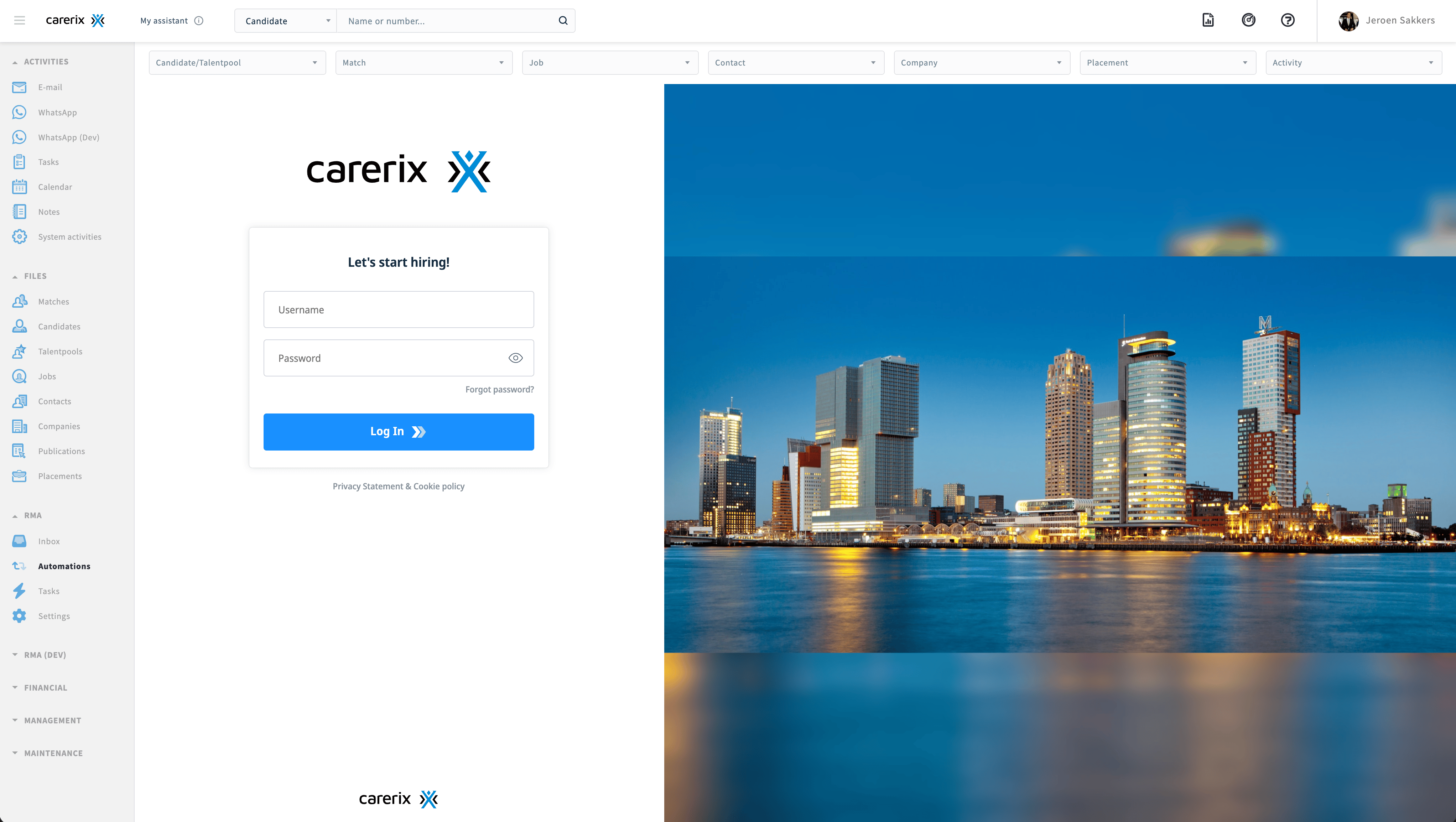 Do not sign in again inside the embedded login screen. Allow Carerix cookies in your browser instead.
## How to recognize this issue
Blocked cross-site cookies can cause the HireData RMA or another Carerix Marketplace integration to:
* Show a Carerix login screen even though you are already signed in
* Return to the login screen immediately after you sign in
* Remain white or gray instead of loading
* Show a connection refused or session expired message
## Why this happens
Carerix Marketplace loads HireData inside a cross-site iframe. The iframe starts an OpenID Connect login with the Carerix Identity Server. Carerix SSO then uses your existing Carerix session to authenticate you without asking for your credentials again.
If your browser prevents that session cookie from being used inside the iframe, the Identity Server cannot recognize your existing session. The embedded app can then display a login screen or enter a login loop.
This is a known limitation of browser privacy controls and Carerix's iframe-based Marketplace SSO. It is not a defect in HireData's OpenID Connect implementation. Carerix describes the expected flow in its [Marketplace authentication and SSO documentation](https://help.carerix.com/en/articles/14034043-carerix-marketplace-framework-authentication-sso-flow).
## Comet and Google Chrome
Comet is based on Chromium, so you can use the same cookie exception as in Google Chrome.
Open your browser's **Settings**, then go to **Privacy and security** > **Third-party cookies**.
Under **Sites allowed to use third-party cookies**, click **Add**.
Enter the following address exactly and click **Add**:
```text theme={null}
[*.]carerix.net
```
The `[*.]` prefix includes your Carerix environment and all other `carerix.net` subdomains.
Carerix also recommends allowing its Identity Server domain. Add this as a separate entry:
```text theme={null}
[*.]carerix.io
```
Return to Carerix and reload the page. Open the HireData RMA again. It should now open without showing the Carerix login screen.
### Allow cookies from the address bar
If your browser displays a blocked third-party cookies icon in the address bar, you can also click that icon and turn on **Third-party cookies** for the current site. Reload the page afterward.
Adding `[*.]carerix.net` in **Settings** is the more reliable option because it covers every Carerix environment on that domain.
## Safari on macOS
Safari does not support a website-specific exception for this type of cross-site tracking protection. You must change the setting for the entire browser.
In the Safari menu, click **Settings**, then open **Privacy**.
Turn off **Prevent cross-site tracking**. Make sure **Block all cookies** is also turned off.
Close **Settings**, return to Carerix, and reload the page. Open the HireData RMA again.
If the HireData RMA loads after this change, Safari's cross-site tracking protection was the cause.
Turning off **Prevent cross-site tracking** affects every website in Safari. If you prefer a site-specific exception, use Comet or Chrome and allow only the Carerix domains listed above.
Do not test this in an Incognito or Private window. These modes often block third-party cookies by default.
## If you cannot change the setting
Your organization may manage your browser settings. If the option is unavailable or locked, ask your IT administrator to allow third-party cookies for `[*.]carerix.net` and `[*.]carerix.io`.
In Comet or Chrome, these exceptions allow Carerix to keep you signed in inside the HireData iframe. They do not enable third-party cookies for every website.
## Carerix resources
* [Marketplace authentication and SSO flow](https://help.carerix.com/en/articles/14034043-carerix-marketplace-framework-authentication-sso-flow)
* [Allow third-party cookies](https://help.carerix.com/en/articles/9857670-allow-third-party-cookies)
* [Cross-site cookie symptoms and Safari limitations](https://help.carerix.com/nl/articles/14706388-cross-site-cookies)
* [Troubleshoot integrations blocked by third-party-cookie settings](https://help.carerix.com/en/articles/13375528-troubleshooting-dashboards-or-integrations-not-loading-chrome-version-144-third-party-cookies)
## Related topics
- [Carerix integration overview](/apps/carerix/overview.md)
- [Enable Carerix fields and relationships in automations](/apps/carerix/how-to-enable-carerix-fields-and-relationships-in-your-automations.md)
- [Sending an email newsletter to your audience](/apps/messaging/emails/sending-an-email-newsletter-to-your-audience.md)
- [HireData MCP: Connect HireData to your AI assistant](/apps/mcp/connect-hiredata-to-your-ai-assistant.md)
- [How to add a WhatsApp chat button to your website](/apps/messaging/whatsapp/how-to-add-a-whatsapp-chat-button-to-your-website.md)
Do not sign in again inside the embedded login screen. Allow Carerix cookies in your browser instead.
## How to recognize this issue
Blocked cross-site cookies can cause the HireData RMA or another Carerix Marketplace integration to:
* Show a Carerix login screen even though you are already signed in
* Return to the login screen immediately after you sign in
* Remain white or gray instead of loading
* Show a connection refused or session expired message
## Why this happens
Carerix Marketplace loads HireData inside a cross-site iframe. The iframe starts an OpenID Connect login with the Carerix Identity Server. Carerix SSO then uses your existing Carerix session to authenticate you without asking for your credentials again.
If your browser prevents that session cookie from being used inside the iframe, the Identity Server cannot recognize your existing session. The embedded app can then display a login screen or enter a login loop.
This is a known limitation of browser privacy controls and Carerix's iframe-based Marketplace SSO. It is not a defect in HireData's OpenID Connect implementation. Carerix describes the expected flow in its [Marketplace authentication and SSO documentation](https://help.carerix.com/en/articles/14034043-carerix-marketplace-framework-authentication-sso-flow).
## Comet and Google Chrome
Comet is based on Chromium, so you can use the same cookie exception as in Google Chrome.
Open your browser's **Settings**, then go to **Privacy and security** > **Third-party cookies**.
Under **Sites allowed to use third-party cookies**, click **Add**.
Enter the following address exactly and click **Add**:
```text theme={null}
[*.]carerix.net
```
The `[*.]` prefix includes your Carerix environment and all other `carerix.net` subdomains.
Carerix also recommends allowing its Identity Server domain. Add this as a separate entry:
```text theme={null}
[*.]carerix.io
```
Return to Carerix and reload the page. Open the HireData RMA again. It should now open without showing the Carerix login screen.
### Allow cookies from the address bar
If your browser displays a blocked third-party cookies icon in the address bar, you can also click that icon and turn on **Third-party cookies** for the current site. Reload the page afterward.
Adding `[*.]carerix.net` in **Settings** is the more reliable option because it covers every Carerix environment on that domain.
## Safari on macOS
Safari does not support a website-specific exception for this type of cross-site tracking protection. You must change the setting for the entire browser.
In the Safari menu, click **Settings**, then open **Privacy**.
Turn off **Prevent cross-site tracking**. Make sure **Block all cookies** is also turned off.
Close **Settings**, return to Carerix, and reload the page. Open the HireData RMA again.
If the HireData RMA loads after this change, Safari's cross-site tracking protection was the cause.
Turning off **Prevent cross-site tracking** affects every website in Safari. If you prefer a site-specific exception, use Comet or Chrome and allow only the Carerix domains listed above.
Do not test this in an Incognito or Private window. These modes often block third-party cookies by default.
## If you cannot change the setting
Your organization may manage your browser settings. If the option is unavailable or locked, ask your IT administrator to allow third-party cookies for `[*.]carerix.net` and `[*.]carerix.io`.
In Comet or Chrome, these exceptions allow Carerix to keep you signed in inside the HireData iframe. They do not enable third-party cookies for every website.
## Carerix resources
* [Marketplace authentication and SSO flow](https://help.carerix.com/en/articles/14034043-carerix-marketplace-framework-authentication-sso-flow)
* [Allow third-party cookies](https://help.carerix.com/en/articles/9857670-allow-third-party-cookies)
* [Cross-site cookie symptoms and Safari limitations](https://help.carerix.com/nl/articles/14706388-cross-site-cookies)
* [Troubleshoot integrations blocked by third-party-cookie settings](https://help.carerix.com/en/articles/13375528-troubleshooting-dashboards-or-integrations-not-loading-chrome-version-144-third-party-cookies)
## Related topics
- [Carerix integration overview](/apps/carerix/overview.md)
- [Enable Carerix fields and relationships in automations](/apps/carerix/how-to-enable-carerix-fields-and-relationships-in-your-automations.md)
- [Sending an email newsletter to your audience](/apps/messaging/emails/sending-an-email-newsletter-to-your-audience.md)
- [HireData MCP: Connect HireData to your AI assistant](/apps/mcp/connect-hiredata-to-your-ai-assistant.md)
- [How to add a WhatsApp chat button to your website](/apps/messaging/whatsapp/how-to-add-a-whatsapp-chat-button-to-your-website.md)