> ## Documentation Index
> Fetch the complete documentation index at: https://help.hiredata.com/llms.txt
> Use this file to discover all available pages before exploring further.
# Connect with Ratecard
> Effortlessly connect HireData with Ratecard: a simple, efficient guide to sending automated surveys and collecting reviews via HireData.
*Welcome to our detailed guide on connecting your Ratecard account with HireData. This tutorial is designed to be user-friendly and efficient, helping you to leverage the full potential of Ratecard within your HireData workflows. For a visual guide, be sure to watch our step-by-step video.*
## Step 1: Navigating to the Ratecard App
Begin by accessing the [app section](https://app.hiredata.com/apps/) in HireData. Here, you'll find the [Ratecard app](https://app.hiredata.com/apps/ratecard). Selecting Ratecard is your first step towards integration.
## Step 2: Creating a New Connection
Once you've selected Ratecard, click on the \[+ New Connection] button. This action will initiate the process of linking your Ratecard account with HireData.
*Click \[+ New Connection] and start connecting your Ratecard*
 ## Step 3: Acquiring the Access Token
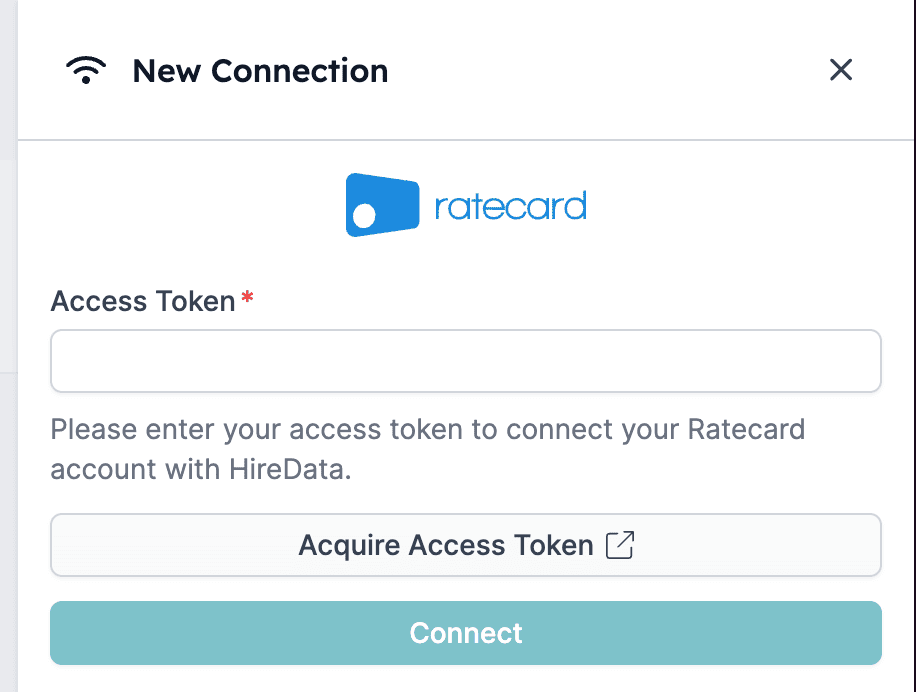
To proceed, acquire an access token by clicking on the link provided in HireData. This token is crucial for establishing a secure connection between your Ratecard and HireData accounts.
*Provide your access token to set up a new connection*
## Step 3: Acquiring the Access Token
To proceed, acquire an access token by clicking on the link provided in HireData. This token is crucial for establishing a secure connection between your Ratecard and HireData accounts.
*Provide your access token to set up a new connection*
 ## Related topics
- [Connect with Recruitee](/apps/recruitee/connect-with-recruitee.md)
- [Connect with Salesforce](/apps/salesforce/connect-with-salesforce.md)
- [Connect with Vincere](/apps/vincere/connect-with-vincere.md)
- [Connect with OTYS](/apps/otys/connect-with-otys.md)
- [Connect with Carerix](/apps/carerix/connect-with-carerix.md)
## Related topics
- [Connect with Recruitee](/apps/recruitee/connect-with-recruitee.md)
- [Connect with Salesforce](/apps/salesforce/connect-with-salesforce.md)
- [Connect with Vincere](/apps/vincere/connect-with-vincere.md)
- [Connect with OTYS](/apps/otys/connect-with-otys.md)
- [Connect with Carerix](/apps/carerix/connect-with-carerix.md)