> ## Documentation Index
> Fetch the complete documentation index at: https://help.hiredata.com/llms.txt
> Use this file to discover all available pages before exploring further.
# Loop
> The Loop step in a HireData automation: which records it retrieves, the filter, stop on first success, the output variable, and how iterations run.
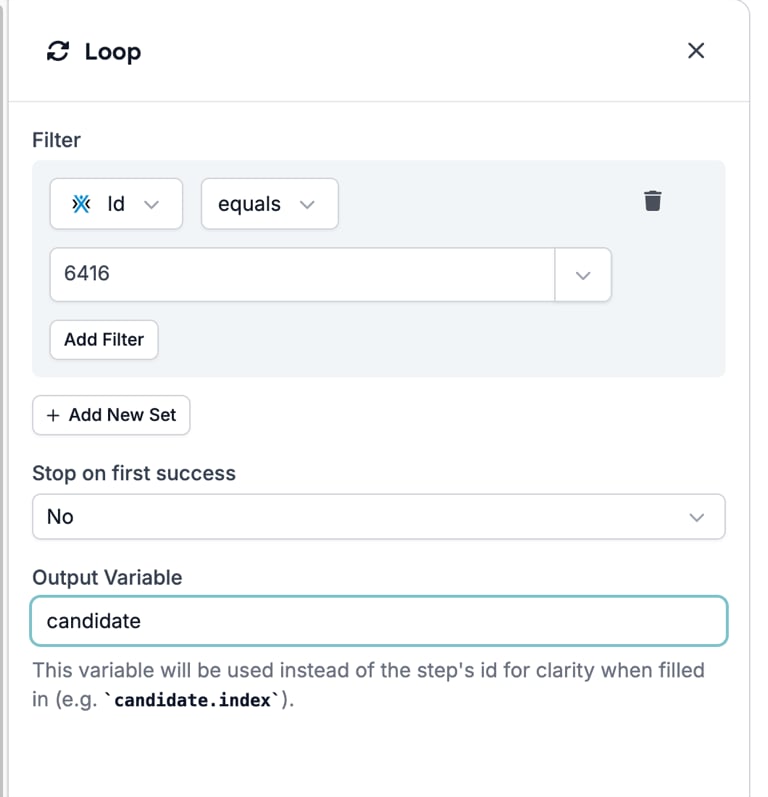
**Loop** repeats the steps inside it once per record. The drawer is headed **Loop** and opens with one option, **Custom**, described as "Loops through a selection of records." Choosing it leads to the object list, then the filter panel.
After you save, the **Next step** picker opens for the first step inside the loop.
## Settings
* **Select an object**. The record type to retrieve, with a **Search** box. Each entry names its connection underneath. With Carerix connected the list holds Candidates, Companies, Contacts, Emails, Lists, Matches, Meetings, Notes, Offices, Placements, Publications, Talent Pools, Tasks, Users, and Vacancies. HireData's own objects are not offered.
* **Filter**. Which records to retrieve, in the same rows and sets as a [Filter step](/reference/automations/steps/filter). The fields are the object's fields, each prefixed with the connection's icon. Leave it empty and the loop retrieves every record of the object.
* **Stop on first success**. **No** or **Yes**, default **No**. With **Yes** the loop ends after the first iteration that completes, so the steps inside run for one record at most.
* **Output Variable**. A name for the current record, placeholder `myLoopItem`. The help text reads "This variable will be used instead of the step's id for clarity when filled in" and its example updates as you type, so `candidate` gives `candidate.index`. Leave it empty and the variables are named after the step's id instead.
 ### On the canvas
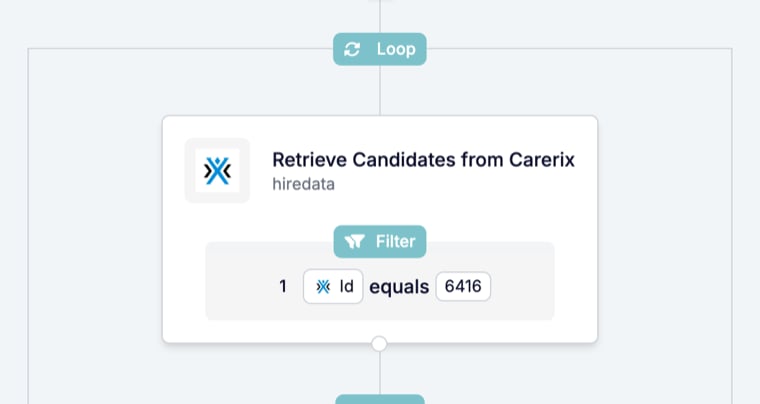
The Loop draws a box with a **Loop** badge. Inside it sits the record card, with a line such as "Retrieve Candidates from Carerix", the connection name, and the filter, followed by the loop's own steps and a **+** to add more.
### On the canvas
The Loop draws a box with a **Loop** badge. Inside it sits the record card, with a line such as "Retrieve Candidates from Carerix", the connection name, and the filter, followed by the loop's own steps and a **+** to add more.
 ## What it outputs
For each iteration, under the output variable:
| Variable | Holds |
| ------------------------ | ------------------------------------------------------------- |
| `candidate.index` | The iteration number, counting from 0 |
| `candidate.item.` | A field of the current record, such as `candidate.item.email` |
Steps inside the loop read these alongside the event's fields. Steps after the loop do not: they see the variables that existed before the loop.
Each iteration is a sub-run. The runs list shows a row per sub-run, so the runs count for an automation with a Loop exceeds its events count. The parent run page folds the iterations into one diagram and its timeline records "Waiting." while they run.
## What stops the run
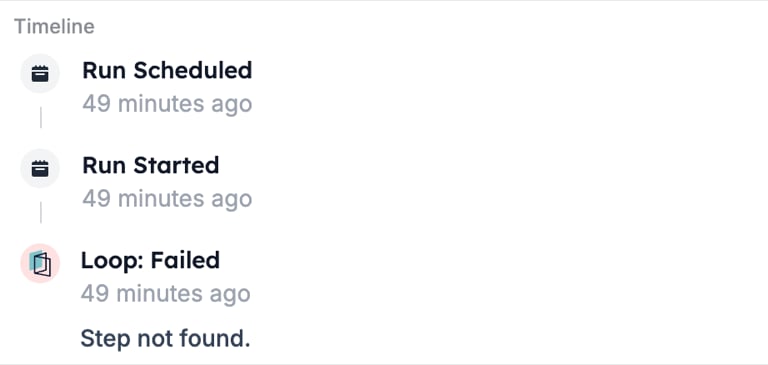
* A loop with no step inside it. The timeline records "Loop: Failed" with the message "Step not found." and the run ends there. The Loop box itself carries no status line.
* Records that cannot be retrieved. The Loop shows Cancelled with the message "Data lookup failed." Check the connection and the filter fields.
* A step inside the loop that stops. It stops that iteration's sub-run only; the other iterations and the steps after the loop continue.
## What it outputs
For each iteration, under the output variable:
| Variable | Holds |
| ------------------------ | ------------------------------------------------------------- |
| `candidate.index` | The iteration number, counting from 0 |
| `candidate.item.` | A field of the current record, such as `candidate.item.email` |
Steps inside the loop read these alongside the event's fields. Steps after the loop do not: they see the variables that existed before the loop.
Each iteration is a sub-run. The runs list shows a row per sub-run, so the runs count for an automation with a Loop exceeds its events count. The parent run page folds the iterations into one diagram and its timeline records "Waiting." while they run.
## What stops the run
* A loop with no step inside it. The timeline records "Loop: Failed" with the message "Step not found." and the run ends there. The Loop box itself carries no status line.
* Records that cannot be retrieved. The Loop shows Cancelled with the message "Data lookup failed." Check the connection and the filter fields.
* A step inside the loop that stops. It stops that iteration's sub-run only; the other iterations and the steps after the loop continue.
 See [Run cancellation reasons](/knowledge-base/run-cancellation-reasons).
## Patterns
* **Narrow the filter.** Filter on the record you mean, such as the candidate's id from the event, rather than retrieving every candidate and filtering inside the loop.
* **First match only.** Set **Stop on first success** to **Yes** and put a [Filter](/reference/automations/steps/filter) as the first step inside. The loop ends at the first record that passes.
* **Name the variable.** An output variable such as `vacancy` reads better than a step id in a prompt or an email template, and it survives when the step is rebuilt.
## Common mistakes
* **No filter.** The loop retrieves every record of the object and runs the inner steps for each. Add a filter before activating.
* **Reading loop variables after the loop.** They exist only inside it. Write what you need into a record with an [Update](/reference/automations/steps/update) task inside the loop.
* **Expecting to loop over text or a range.** The drawer offers records from a connected app only. To repeat over the lines of a text field or a fixed count, split the work another way, such as a [Prompt](/reference/automations/steps/prompt) with a List output.
## Related
* [Find](/reference/automations/steps/find) retrieves one record instead of many.
* [Split](/reference/automations/steps/split) also creates sub-runs, one per branch rather than one per record.
* [Filter](/reference/automations/steps/filter) documents the rows, sets, and operators the loop's filter shares.
## Related topics
- [Find](/reference/automations/steps/find.md)
- [Automation steps overview](/reference/automations/overview.md)
- [Run cancellation reasons](/knowledge-base/run-cancellation-reasons.md)
- [Allow Carerix cookies in your browser](/apps/carerix/allow-carerix-cookies-in-your-browser.md)
- [Split](/reference/automations/steps/split.md)
See [Run cancellation reasons](/knowledge-base/run-cancellation-reasons).
## Patterns
* **Narrow the filter.** Filter on the record you mean, such as the candidate's id from the event, rather than retrieving every candidate and filtering inside the loop.
* **First match only.** Set **Stop on first success** to **Yes** and put a [Filter](/reference/automations/steps/filter) as the first step inside. The loop ends at the first record that passes.
* **Name the variable.** An output variable such as `vacancy` reads better than a step id in a prompt or an email template, and it survives when the step is rebuilt.
## Common mistakes
* **No filter.** The loop retrieves every record of the object and runs the inner steps for each. Add a filter before activating.
* **Reading loop variables after the loop.** They exist only inside it. Write what you need into a record with an [Update](/reference/automations/steps/update) task inside the loop.
* **Expecting to loop over text or a range.** The drawer offers records from a connected app only. To repeat over the lines of a text field or a fixed count, split the work another way, such as a [Prompt](/reference/automations/steps/prompt) with a List output.
## Related
* [Find](/reference/automations/steps/find) retrieves one record instead of many.
* [Split](/reference/automations/steps/split) also creates sub-runs, one per branch rather than one per record.
* [Filter](/reference/automations/steps/filter) documents the rows, sets, and operators the loop's filter shares.
## Related topics
- [Find](/reference/automations/steps/find.md)
- [Automation steps overview](/reference/automations/overview.md)
- [Run cancellation reasons](/knowledge-base/run-cancellation-reasons.md)
- [Allow Carerix cookies in your browser](/apps/carerix/allow-carerix-cookies-in-your-browser.md)
- [Split](/reference/automations/steps/split.md)