> ## Documentation Index
> Fetch the complete documentation index at: https://help.hiredata.com/llms.txt
> Use this file to discover all available pages before exploring further.
# Button
> The Button block in the HireData email builder: the URL it opens, the size and corner presets, and how to write the text on it.
A Button block is a call to action that opens a URL. Add it from the **Blocks** menu of a section or a column.
A new button arrives reading "Click Me". Click it in the email and type over it.
## How it renders
The button comes out as a link styled to look like a button, at the width and alignment you set, on a row of its own. **Width: Full** stretches it across the section; in a column it stretches across the column.
 ## Settings
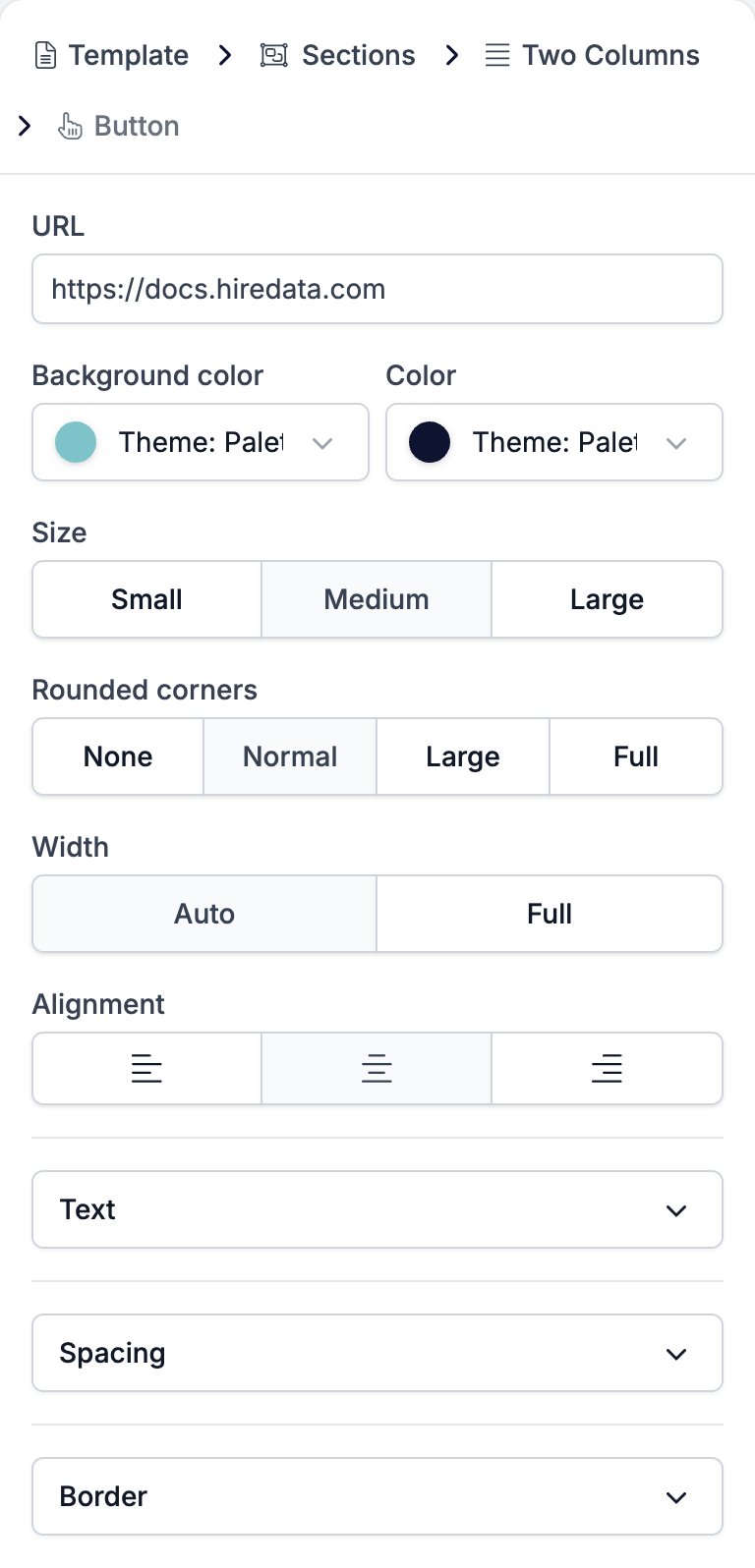
* **URL** is the address the button opens. The box takes a variable, so a button can point at a link that changes per recipient.
* **Background color** and **Color** sit side by side and style the button and its text.
* **Size** is **Small**, **Medium**, or **Large**. It moves the text size and the padding together, from 12 pixel text in a tight box to 24 pixel text in a generous one.
* **Rounded corners** is **None**, **Normal**, **Large**, or **Full**, which runs from square through to a pill.
* **Width** is **Auto**, which fits the button to its text, or **Full**, which stretches it across whatever holds it.
* **Alignment** is left, centre, or right, and does nothing at **Full** width.
* **Text** holds **Font Family** with a weight selector, **Size**, **Letter Spacing**, and **Line Height**.
* **Spacing** holds two controls.
* **Margin**, the gap above and below the button.
* **Padding**, the space between the text and the button's edge.
* **Border** holds **Border color**, **Border width**, and **Border radius**.
## Settings
* **URL** is the address the button opens. The box takes a variable, so a button can point at a link that changes per recipient.
* **Background color** and **Color** sit side by side and style the button and its text.
* **Size** is **Small**, **Medium**, or **Large**. It moves the text size and the padding together, from 12 pixel text in a tight box to 24 pixel text in a generous one.
* **Rounded corners** is **None**, **Normal**, **Large**, or **Full**, which runs from square through to a pill.
* **Width** is **Auto**, which fits the button to its text, or **Full**, which stretches it across whatever holds it.
* **Alignment** is left, centre, or right, and does nothing at **Full** width.
* **Text** holds **Font Family** with a weight selector, **Size**, **Letter Spacing**, and **Line Height**.
* **Spacing** holds two controls.
* **Margin**, the gap above and below the button.
* **Padding**, the space between the text and the button's edge.
* **Border** holds **Border color**, **Border width**, and **Border radius**.
 **Size** and **Text** both set the font size, and whichever you touch last wins. Picking a **Size** rewrites the size in **Text**, so set the size first and adjust it afterwards if you want a value the three presets do not offer.
The words on a button are the link text, and they are all a screen reader announces. "Read the reference" or "Book your slot" tells someone what happens. "Click here" and "Read more" tell them nothing, and a recipient skipping through the email hears a list of identical links. Say what is on the other side.
## Limits
HireData supports `http`, `https`, `mailto`, and `tel` addresses, and a variable that resolves to one of them. The **URL** box does not check what you type, so a mistyped scheme reaches the recipient as a dead link. Test the email before you send it.
An email template sent to the HireData API with any other scheme is rejected with "Builder links and images must use a supported URL scheme or a HireData variable."
## Related
* [Email builder overview](/reference/email-builder/overview) covers the builder, the toolbar, the theme, and every block type.
* [Paragraph](/reference/email-builder/blocks/paragraph) covers links inside body text, which take the same schemes.
* [Form](/reference/email-builder/blocks/form) draws its own buttons, and points them at a form rather than a URL.
* [Variables](/reference/email-builder/variables) covers the tokens the **URL** box takes.
## Related topics
- [How to add a WhatsApp chat button to your website](/apps/messaging/whatsapp/how-to-add-a-whatsapp-chat-button-to-your-website.md)
- [How WhatsApp templates work](/apps/messaging/whatsapp/how-whatsapp-templates-work.md)
- [Ask for feedback in one click](/knowledge-base/cookbook/one-click-feedback-email.md)
- [Form](/reference/email-builder/blocks/form.md)
- [Ending Screen](/reference/forms/fields/ending-screen.md)
**Size** and **Text** both set the font size, and whichever you touch last wins. Picking a **Size** rewrites the size in **Text**, so set the size first and adjust it afterwards if you want a value the three presets do not offer.
The words on a button are the link text, and they are all a screen reader announces. "Read the reference" or "Book your slot" tells someone what happens. "Click here" and "Read more" tell them nothing, and a recipient skipping through the email hears a list of identical links. Say what is on the other side.
## Limits
HireData supports `http`, `https`, `mailto`, and `tel` addresses, and a variable that resolves to one of them. The **URL** box does not check what you type, so a mistyped scheme reaches the recipient as a dead link. Test the email before you send it.
An email template sent to the HireData API with any other scheme is rejected with "Builder links and images must use a supported URL scheme or a HireData variable."
## Related
* [Email builder overview](/reference/email-builder/overview) covers the builder, the toolbar, the theme, and every block type.
* [Paragraph](/reference/email-builder/blocks/paragraph) covers links inside body text, which take the same schemes.
* [Form](/reference/email-builder/blocks/form) draws its own buttons, and points them at a form rather than a URL.
* [Variables](/reference/email-builder/variables) covers the tokens the **URL** box takes.
## Related topics
- [How to add a WhatsApp chat button to your website](/apps/messaging/whatsapp/how-to-add-a-whatsapp-chat-button-to-your-website.md)
- [How WhatsApp templates work](/apps/messaging/whatsapp/how-whatsapp-templates-work.md)
- [Ask for feedback in one click](/knowledge-base/cookbook/one-click-feedback-email.md)
- [Form](/reference/email-builder/blocks/form.md)
- [Ending Screen](/reference/forms/fields/ending-screen.md)