> ## Documentation Index
> Fetch the complete documentation index at: https://help.hiredata.com/llms.txt
> Use this file to discover all available pages before exploring further.
# Form
> The Form block in the HireData email builder: buttons that answer one of your form questions from inside the email, and what each question type turns into.
A Form block puts one question from one of your forms straight into the email. The recipient answers by clicking a button, which opens the form with that answer already filled in. It is how a feedback email gets a reply in one click rather than two.
Add it from a section's **Blocks** menu. A column cannot hold one.
## How it renders
What the block puts in the email depends on the type of the leading question.
* **Net Promoter Score** renders eleven buttons, 0 to 10, whatever range the question itself carries.
* **Opinion Scale** renders one button per point on its own range, with the question's end labels underneath in capitals.
* **Multiple Choice** and **Dropdown** render one button per option.
* Everything else renders a single call to action reading "Give Feedback". Click it in the email to write your own wording.
 The star and emoji rating variants that [only an integration can add](/reference/forms/overview) draw one button per value as well, a star or an emoji in place of a number. Thumbs and slider get the single call to action.
Each button is its own column, so on a screen narrower than 480 pixels the row stops fitting and the buttons stack one per line. A Net Promoter Score question becomes eleven stacked buttons on a phone, which is worth seeing in the preview before you send it.
The block renders in the language of the form it points at, not in the language of the email. An English template bound to a Dutch form puts Dutch buttons in the email. Check the canvas before you send.
## Settings
* **Form** picks the form to point at. The list searches every form in the workspace.
* **Leading Question** picks the question the buttons answer. Hidden questions and ending screens are left out of the list.
* **Background color** and **Color** style the buttons.
* **Show Question** puts the question's own wording above the buttons, or leaves it out.
* **Size** is **Small**, **Medium**, or **Large**, which sets the text size and the padding together.
* **Rounded corners** is **None**, **Normal**, **Large**, or **Full**, from square to a full pill.
* **Width** is **Auto**, **Half**, **Full**, or **Custom**, which opens a slider from 35 to 100 per cent.
* **Alignment** is left, centre, or right.
* **Text** holds **Font Family** with a weight selector, **Size**, **Letter Spacing**, and **Line Height**.
* **Spacing** holds two controls.
* **Margin**, the gap above and below the buttons.
* **Padding**, the space between the label and each button's edge.
* **Border** holds **Border color**, **Border width**, and **Border radius**.
The star and emoji rating variants that [only an integration can add](/reference/forms/overview) draw one button per value as well, a star or an emoji in place of a number. Thumbs and slider get the single call to action.
Each button is its own column, so on a screen narrower than 480 pixels the row stops fitting and the buttons stack one per line. A Net Promoter Score question becomes eleven stacked buttons on a phone, which is worth seeing in the preview before you send it.
The block renders in the language of the form it points at, not in the language of the email. An English template bound to a Dutch form puts Dutch buttons in the email. Check the canvas before you send.
## Settings
* **Form** picks the form to point at. The list searches every form in the workspace.
* **Leading Question** picks the question the buttons answer. Hidden questions and ending screens are left out of the list.
* **Background color** and **Color** style the buttons.
* **Show Question** puts the question's own wording above the buttons, or leaves it out.
* **Size** is **Small**, **Medium**, or **Large**, which sets the text size and the padding together.
* **Rounded corners** is **None**, **Normal**, **Large**, or **Full**, from square to a full pill.
* **Width** is **Auto**, **Half**, **Full**, or **Custom**, which opens a slider from 35 to 100 per cent.
* **Alignment** is left, centre, or right.
* **Text** holds **Font Family** with a weight selector, **Size**, **Letter Spacing**, and **Line Height**.
* **Spacing** holds two controls.
* **Margin**, the gap above and below the buttons.
* **Padding**, the space between the label and each button's edge.
* **Border** holds **Border color**, **Border width**, and **Border radius**.
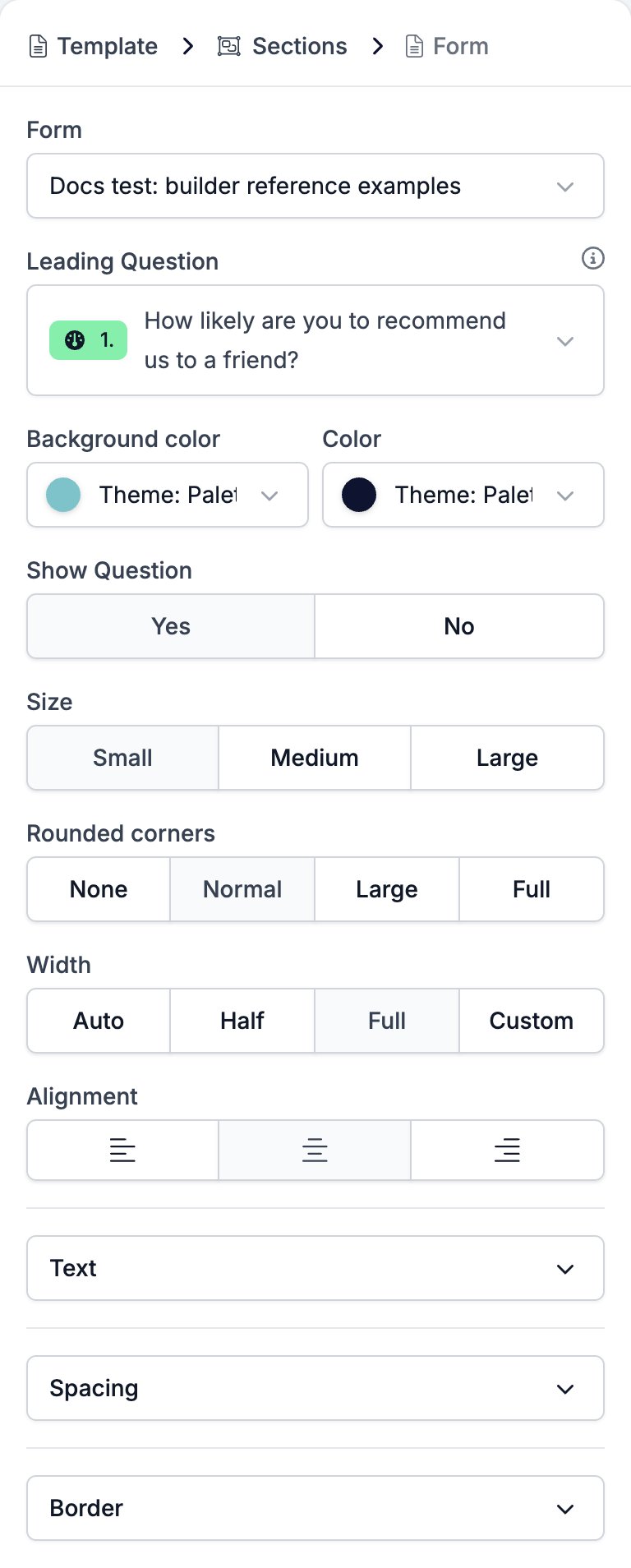 **Form** and **Leading Question** belong to the email rather than to the block. Add a second Form block and it arrives already pointing at the same form and the same question, and changing either one changes both blocks.
## Limits
* A choice question renders its **first five options only**. A sixth option gets no button, no warning, and no sign in the canvas that it is missing. Reorder the question so the five that matter come first, or point the block at a shorter question.
* A Net Promoter Score question is always 0 to 10 here. Whatever range the question carries is ignored.
## Related
* [Email builder overview](/reference/email-builder/overview) covers the builder, the toolbar, the theme, and every block type.
* [Form builder overview](/reference/forms/overview) covers the forms a Form block can point at.
* [Net Promoter Score and Opinion Scale](/reference/forms/fields/net-promoter-score-and-opinion-scale) is the question type behind the eleven buttons.
* [Multiple Choice and Dropdown](/reference/forms/fields/multiple-choice-and-dropdown) is the question type capped at five buttons.
* [Section](/reference/email-builder/sections) is the only block a Form can go in.
* [Translations](/reference/email-builder/translations) covers the rating labels and call to action a Form block offers per language.
## Related topics
- [Form builder overview](/reference/forms/overview.md)
- [Form evaluation overview](/reference/forms/evaluation/overview.md)
- [Configuring a form per record](/content/configuring-a-form-per-record.md)
- [Creating a form in HireData](/content/creating-a-form-in-hiredata.md)
- [Screen and score applicants with a pre-screening form](/knowledge-base/cookbook/pre-screening-form.md)
**Form** and **Leading Question** belong to the email rather than to the block. Add a second Form block and it arrives already pointing at the same form and the same question, and changing either one changes both blocks.
## Limits
* A choice question renders its **first five options only**. A sixth option gets no button, no warning, and no sign in the canvas that it is missing. Reorder the question so the five that matter come first, or point the block at a shorter question.
* A Net Promoter Score question is always 0 to 10 here. Whatever range the question carries is ignored.
## Related
* [Email builder overview](/reference/email-builder/overview) covers the builder, the toolbar, the theme, and every block type.
* [Form builder overview](/reference/forms/overview) covers the forms a Form block can point at.
* [Net Promoter Score and Opinion Scale](/reference/forms/fields/net-promoter-score-and-opinion-scale) is the question type behind the eleven buttons.
* [Multiple Choice and Dropdown](/reference/forms/fields/multiple-choice-and-dropdown) is the question type capped at five buttons.
* [Section](/reference/email-builder/sections) is the only block a Form can go in.
* [Translations](/reference/email-builder/translations) covers the rating labels and call to action a Form block offers per language.
## Related topics
- [Form builder overview](/reference/forms/overview.md)
- [Form evaluation overview](/reference/forms/evaluation/overview.md)
- [Configuring a form per record](/content/configuring-a-form-per-record.md)
- [Creating a form in HireData](/content/creating-a-form-in-hiredata.md)
- [Screen and score applicants with a pre-screening form](/knowledge-base/cookbook/pre-screening-form.md)