> ## Documentation Index
> Fetch the complete documentation index at: https://help.hiredata.com/llms.txt
> Use this file to discover all available pages before exploring further.
# Socials
> The Socials block in the HireData email builder: a row of social icons, the per-link URL and icon, and how HireData picks an icon from the address.
A Socials block is a row of social icons, one per link. It is the usual way an email points at your accounts, and it usually sits in the last section. Add it from the **Blocks** menu of a section or a column.
Each icon in the row is a **Social**, a block of its own that holds one address and one picture. You add and remove them from the parent Socials block rather than from any menu.
## How it renders
HireData reads the address and picks the icon from it, so a `linkedin.com` link gets the LinkedIn mark without you choosing one. An address it does not recognise gets a plain web icon.
 It also fixes addresses that are not links. A bare email address becomes a `mailto:` link and a bare phone number becomes a `tel:` link, so an icon can dial or open a mail client.
The label beside an icon is text in the email rather than a setting. Click it in the canvas and type, and use **Text** on the parent block to size it. Leave it empty and the row is icons alone.
## Settings
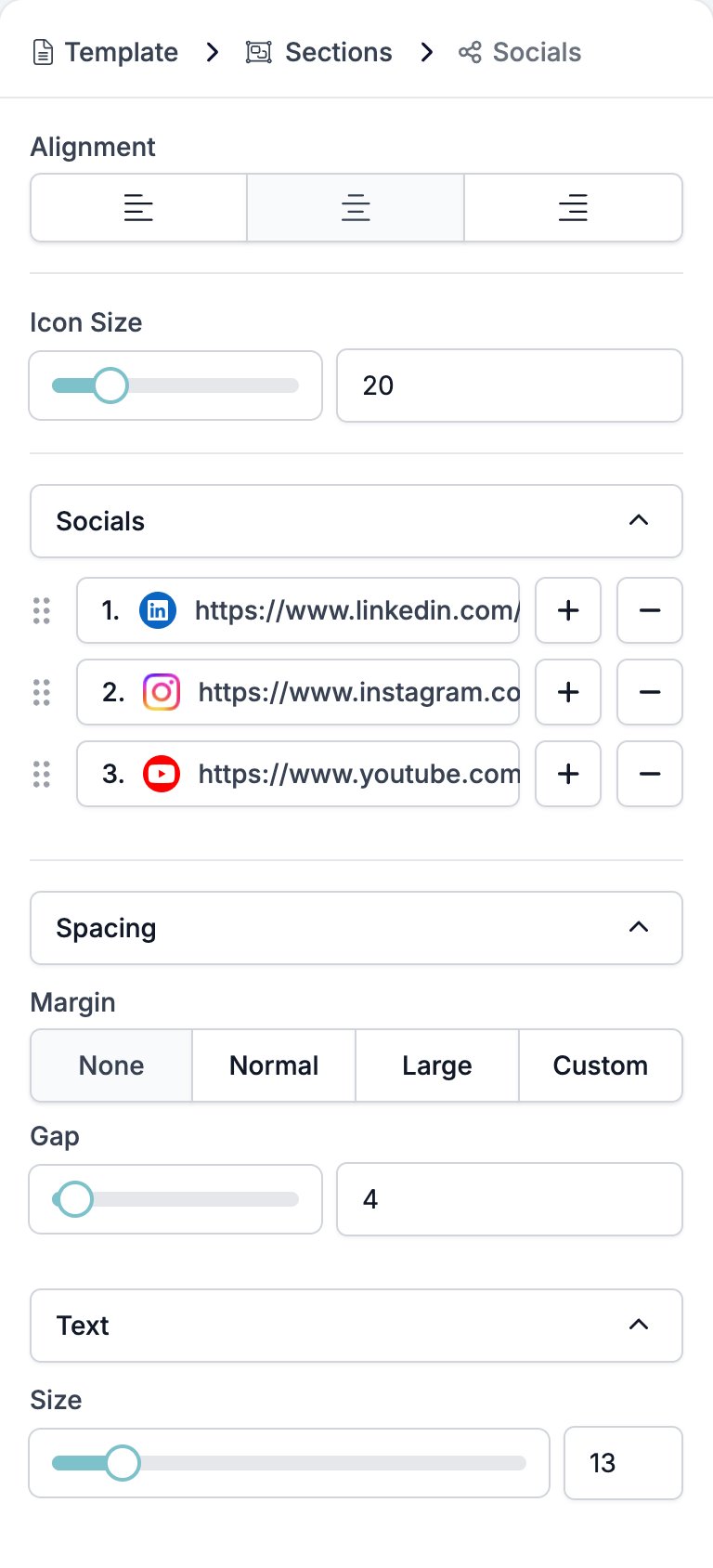
The Socials block carries the settings for the row.
* **Alignment** puts the row left, centre, or right.
* **Icon Size** is a slider and a box, in pixels.
* **Socials** is the list of links, each row labelled with its address. **+** adds another Social straight away, with no menu, because Social is the only thing the block takes. **−** removes one and the handle reorders them.
* **Spacing** holds two controls.
* **Margin**, the space above and below the row.
* **Gap**, the space between the icons.
* **Text** holds **Size**, which sets the size of the label beside an icon. There is no colour control here.
It also fixes addresses that are not links. A bare email address becomes a `mailto:` link and a bare phone number becomes a `tel:` link, so an icon can dial or open a mail client.
The label beside an icon is text in the email rather than a setting. Click it in the canvas and type, and use **Text** on the parent block to size it. Leave it empty and the row is icons alone.
## Settings
The Socials block carries the settings for the row.
* **Alignment** puts the row left, centre, or right.
* **Icon Size** is a slider and a box, in pixels.
* **Socials** is the list of links, each row labelled with its address. **+** adds another Social straight away, with no menu, because Social is the only thing the block takes. **−** removes one and the handle reorders them.
* **Spacing** holds two controls.
* **Margin**, the space above and below the row.
* **Gap**, the space between the icons.
* **Text** holds **Size**, which sets the size of the label beside an icon. There is no colour control here.
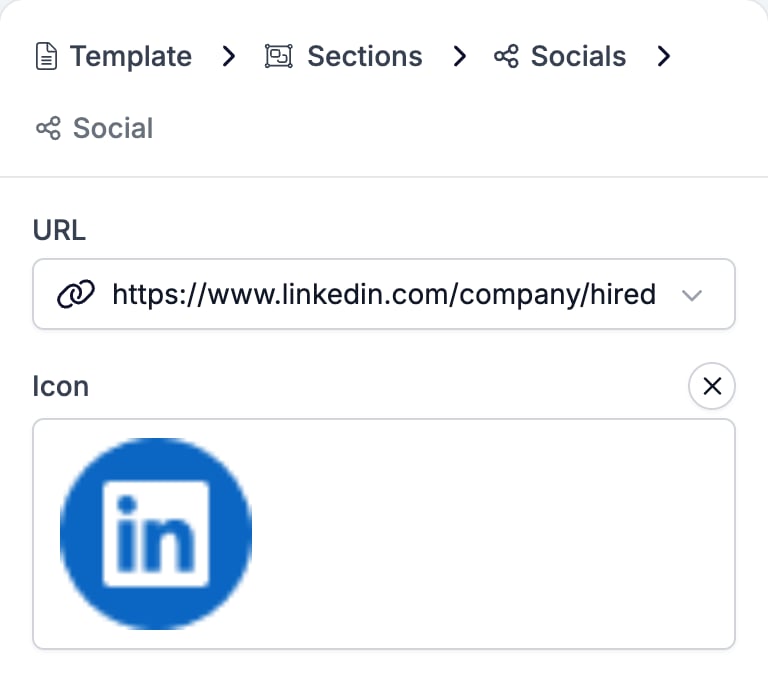
 Click a row in the **Socials** list and the panel moves down to that one link.
* **URL** takes the address. The box also offers every variable in the workspace that carries a URL, a phone number, or an email address, so a link can follow the brand rather than being typed in.
* **Icon** replaces the picture with one of your own. The cross beside the label clears it and hands the choice back to HireData.
Click a row in the **Socials** list and the panel moves down to that one link.
* **URL** takes the address. The box also offers every variable in the workspace that carries a URL, a phone number, or an email address, so a link can follow the brand rather than being typed in.
* **Icon** replaces the picture with one of your own. The cross beside the label clears it and hands the choice back to HireData.
 ## Related
* [Email builder overview](/reference/email-builder/overview) covers the builder, the toolbar, the theme, and every block type.
* [Section](/reference/email-builder/sections) is the band a Socials row usually closes.
* [Button](/reference/email-builder/blocks/button) is the block for a link you want people to click, rather than a row of footers.
* [Variables](/reference/email-builder/variables) covers the tokens the **URL** box offers.
## Related topics
- [Brands](/settings/brands.md)
- [Email builder overview](/reference/email-builder/overview.md)
- [Adding images to your emails](/apps/messaging/emails/adding-images-to-your-emails.md)
- [Connect with WhatsApp: Embedded sign-up](/apps/messaging/whatsapp/connect-with-whatsapp-embedded-sign-up.md)
- [Variables](/reference/email-builder/variables.md)
## Related
* [Email builder overview](/reference/email-builder/overview) covers the builder, the toolbar, the theme, and every block type.
* [Section](/reference/email-builder/sections) is the band a Socials row usually closes.
* [Button](/reference/email-builder/blocks/button) is the block for a link you want people to click, rather than a row of footers.
* [Variables](/reference/email-builder/variables) covers the tokens the **URL** box offers.
## Related topics
- [Brands](/settings/brands.md)
- [Email builder overview](/reference/email-builder/overview.md)
- [Adding images to your emails](/apps/messaging/emails/adding-images-to-your-emails.md)
- [Connect with WhatsApp: Embedded sign-up](/apps/messaging/whatsapp/connect-with-whatsapp-embedded-sign-up.md)
- [Variables](/reference/email-builder/variables.md)