> ## Documentation Index
> Fetch the complete documentation index at: https://help.hiredata.com/llms.txt
> Use this file to discover all available pages before exploring further.
# Sections
> Sections in the HireData email builder: the band that holds the blocks a recipient reads, with its own background, spacing, width, and border.
A section is a band across the email. It holds the blocks a recipient reads, and it carries the background, the padding, and the border behind them. Every block in an email sits in one, so a section is the level you are working at whenever you are not inside a block.
Sections are the only thing a [Template](/reference/email-builder/template) holds, and the **Template** panel is the only place you add one. Open **Blocks** there and click the **+** on any row. No menu opens, because a section is the only thing a Template takes. No section's own menu offers a Section either, so sections never nest.
The builder labels a section **Sections**, plural, wherever it names one, which is worth knowing before you go looking for a row that says which section you are on. [The breadcrumb](/reference/email-builder/template#the-breadcrumb) covers that.
## How it renders
The email body is 600 pixels wide. A section fills that width edge to edge, and its blocks sit in a column inside the padding you set.
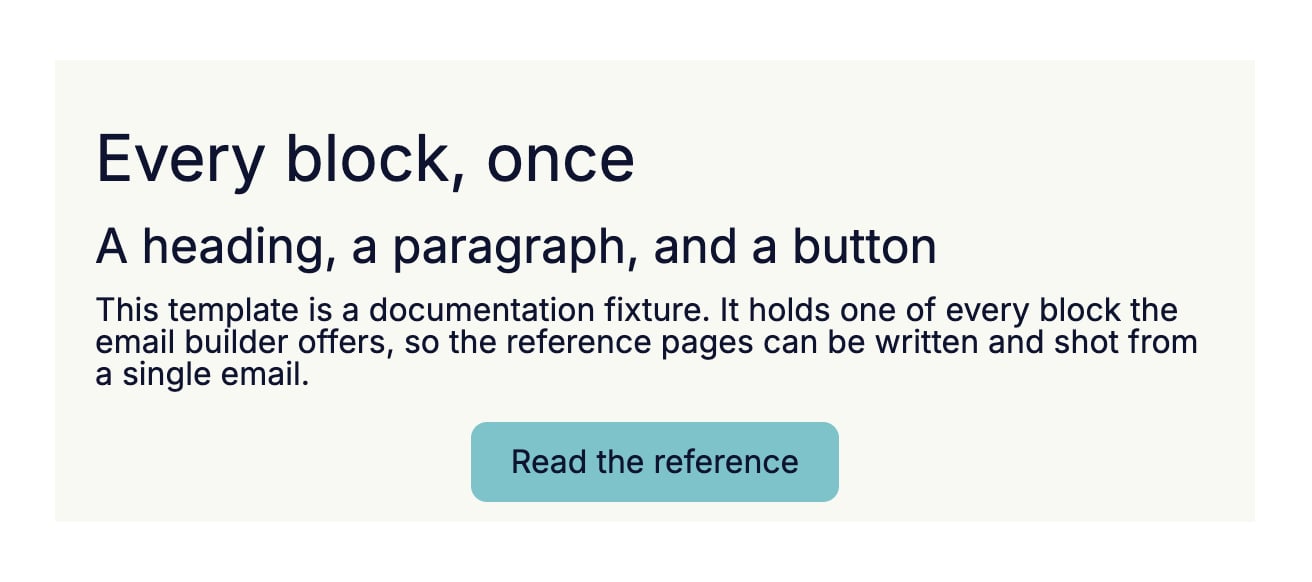 A section with several blocks renders as a stack of rows that share one background. The border and the rounded corners belong to the section rather than to any row. The top border and the top corners land on the first block, the bottom border and the bottom corners on the last, and the rows in between run straight.
## Settings
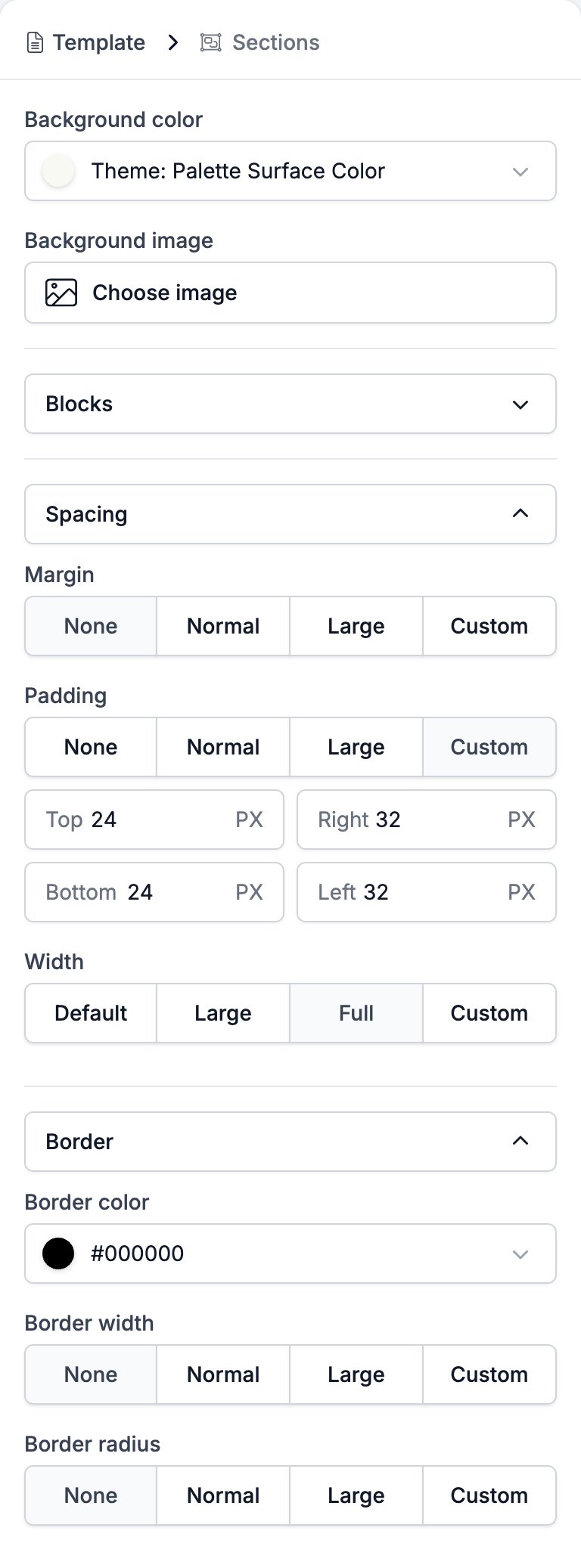
* **Background color** fills the band. It starts on the brand's surface colour, which the control names rather than showing as a hex code.
* **Background image** takes a picture from the media library through **Choose image**, and it sits behind the whole band. The same picker offers the variables that carry an image, so the background can follow the brand.
* **Blocks** lists what the section holds, in order. **+** opens the menu of blocks you can add, **−** deletes a row, and the handle on the left drags it.
* **Spacing** holds three controls.
* **Margin** is the gap outside the band: **None**, **Normal**, **Large**, or **Custom** for a top and a bottom value in pixels.
* **Padding** is the gap inside it, with the same four choices and a box per side.
* **Width** sets how wide the blocks inside the section run: **Default**, **Large**, **Full**, or **Custom**, which opens a slider from 640 to 1240 pixels.
* **Border** holds three controls.
* **Border color** is a colour picker.
* **Border width** is **None**, **Normal**, **Large**, or **Custom** for a value per side.
* **Border radius** is the same four choices, for a value per corner.
A section with several blocks renders as a stack of rows that share one background. The border and the rounded corners belong to the section rather than to any row. The top border and the top corners land on the first block, the bottom border and the bottom corners on the last, and the rows in between run straight.
## Settings
* **Background color** fills the band. It starts on the brand's surface colour, which the control names rather than showing as a hex code.
* **Background image** takes a picture from the media library through **Choose image**, and it sits behind the whole band. The same picker offers the variables that carry an image, so the background can follow the brand.
* **Blocks** lists what the section holds, in order. **+** opens the menu of blocks you can add, **−** deletes a row, and the handle on the left drags it.
* **Spacing** holds three controls.
* **Margin** is the gap outside the band: **None**, **Normal**, **Large**, or **Custom** for a top and a bottom value in pixels.
* **Padding** is the gap inside it, with the same four choices and a box per side.
* **Width** sets how wide the blocks inside the section run: **Default**, **Large**, **Full**, or **Custom**, which opens a slider from 640 to 1240 pixels.
* **Border** holds three controls.
* **Border color** is a colour picker.
* **Border width** is **None**, **Normal**, **Large**, or **Custom** for a value per side.
* **Border radius** is the same four choices, for a value per corner.
 ## Related
* [Email builder overview](/reference/email-builder/overview) covers the builder, the toolbar, the theme, and every block type.
* [Template](/reference/email-builder/template) is the only place a section can go.
* [Two Columns](/reference/email-builder/blocks/columns) splits one section into two.
* [Variables](/reference/email-builder/variables) covers the image tokens the **Background image** picker offers.
## Related topics
- [Email builder overview](/reference/email-builder/overview.md)
- [Template](/reference/email-builder/template.md)
- [Two Columns](/reference/email-builder/blocks/columns.md)
- [Setting up an email template in HireData](/apps/messaging/emails/setting-up-an-email-template-in-hiredata.md)
- [Socials](/reference/email-builder/blocks/socials.md)
## Related
* [Email builder overview](/reference/email-builder/overview) covers the builder, the toolbar, the theme, and every block type.
* [Template](/reference/email-builder/template) is the only place a section can go.
* [Two Columns](/reference/email-builder/blocks/columns) splits one section into two.
* [Variables](/reference/email-builder/variables) covers the image tokens the **Background image** picker offers.
## Related topics
- [Email builder overview](/reference/email-builder/overview.md)
- [Template](/reference/email-builder/template.md)
- [Two Columns](/reference/email-builder/blocks/columns.md)
- [Setting up an email template in HireData](/apps/messaging/emails/setting-up-an-email-template-in-hiredata.md)
- [Socials](/reference/email-builder/blocks/socials.md)