> ## Documentation Index
> Fetch the complete documentation index at: https://help.hiredata.com/llms.txt
> Use this file to discover all available pages before exploring further.
# Translations
> Send one HireData email in several languages: managing languages, what the builder offers for translation, and which language a recipient gets.
One email template can go out in several languages. Write it once in a default language, then add a translation for each other language you send in. HireData picks the right one per recipient.
## Manage Languages
The language button at the end of the toolbar opens **Localization**.
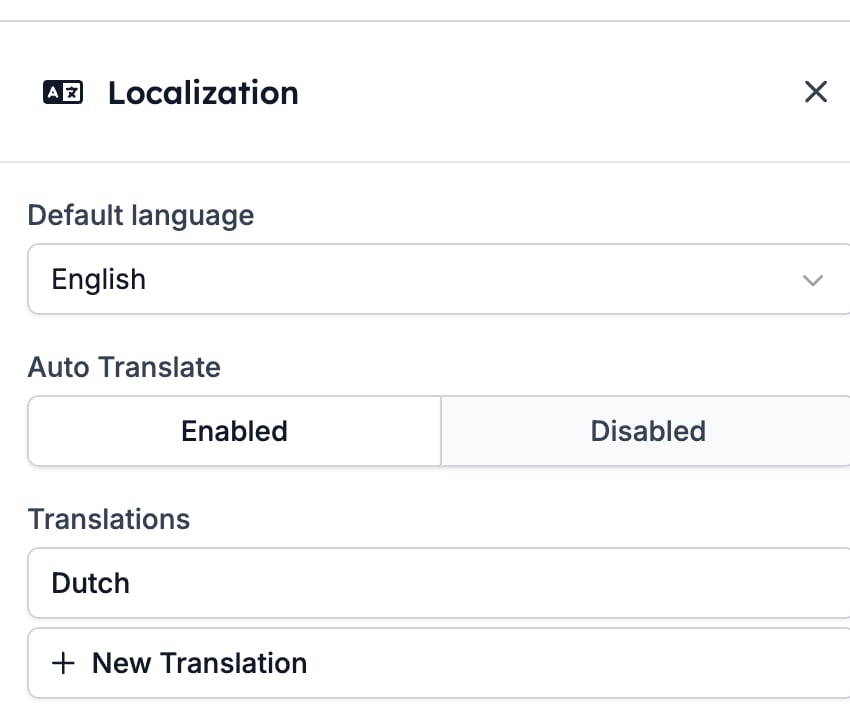 * **Default language** is the language the email is written in. It is what a recipient gets when nothing better is available.
* **Auto Translate** decides what happens when a recipient's language has no translation. See [Which language a recipient gets](#which-language-a-recipient-gets).
* **Translations** lists what you have written so far, with **New Translation** below it.
## What the builder offers for translation
Open a translation and you get one box per piece of translatable content, labelled with the path to the block it belongs to, such as `Template > Sections > Signature > Paragraph: Content`. Above each box sits the original, so you can see what you are translating.
The builder offers:
* The **Subject**.
* The template's **Name**, which is internal.
* [Paragraph](/reference/email-builder/blocks/paragraph) and [heading](/reference/email-builder/blocks/heading) text.
* The words on a [Button](/reference/email-builder/blocks/button).
* The paragraphs inside a [Signature](/reference/email-builder/blocks/signature).
* A [Form](/reference/email-builder/blocks/form) block's call to action and its three rating labels.
Four things never appear, so plan around them.
* An [Image](/reference/email-builder/blocks/image) and its alt text.
* An [HTML](/reference/email-builder/blocks/html) block. What you write in it goes out unchanged in every language.
* A [Socials](/reference/email-builder/blocks/socials) row.
* **Anything inside a [Two Columns](/reference/email-builder/blocks/columns) block.** A paragraph in a section is offered; the same paragraph moved into a column is not. If a passage has to be translated, keep it out of the columns.
## Writing a translation
Click **New Translation**, pick the **Language**, and fill the boxes in.
**Create AI translation** fills every box at once. It keeps your variable chips where they are and translates the words around them, so `Hi {{recipient.first_name}},` comes back as `Hoi {{recipient.first_name}},` rather than losing the name. Read what it wrote before you keep it, and edit any box you disagree with.
* **Default language** is the language the email is written in. It is what a recipient gets when nothing better is available.
* **Auto Translate** decides what happens when a recipient's language has no translation. See [Which language a recipient gets](#which-language-a-recipient-gets).
* **Translations** lists what you have written so far, with **New Translation** below it.
## What the builder offers for translation
Open a translation and you get one box per piece of translatable content, labelled with the path to the block it belongs to, such as `Template > Sections > Signature > Paragraph: Content`. Above each box sits the original, so you can see what you are translating.
The builder offers:
* The **Subject**.
* The template's **Name**, which is internal.
* [Paragraph](/reference/email-builder/blocks/paragraph) and [heading](/reference/email-builder/blocks/heading) text.
* The words on a [Button](/reference/email-builder/blocks/button).
* The paragraphs inside a [Signature](/reference/email-builder/blocks/signature).
* A [Form](/reference/email-builder/blocks/form) block's call to action and its three rating labels.
Four things never appear, so plan around them.
* An [Image](/reference/email-builder/blocks/image) and its alt text.
* An [HTML](/reference/email-builder/blocks/html) block. What you write in it goes out unchanged in every language.
* A [Socials](/reference/email-builder/blocks/socials) row.
* **Anything inside a [Two Columns](/reference/email-builder/blocks/columns) block.** A paragraph in a section is offered; the same paragraph moved into a column is not. If a passage has to be translated, keep it out of the columns.
## Writing a translation
Click **New Translation**, pick the **Language**, and fill the boxes in.
**Create AI translation** fills every box at once. It keeps your variable chips where they are and translates the words around them, so `Hi {{recipient.first_name}},` comes back as `Hoi {{recipient.first_name}},` rather than losing the name. Read what it wrote before you keep it, and edit any box you disagree with.
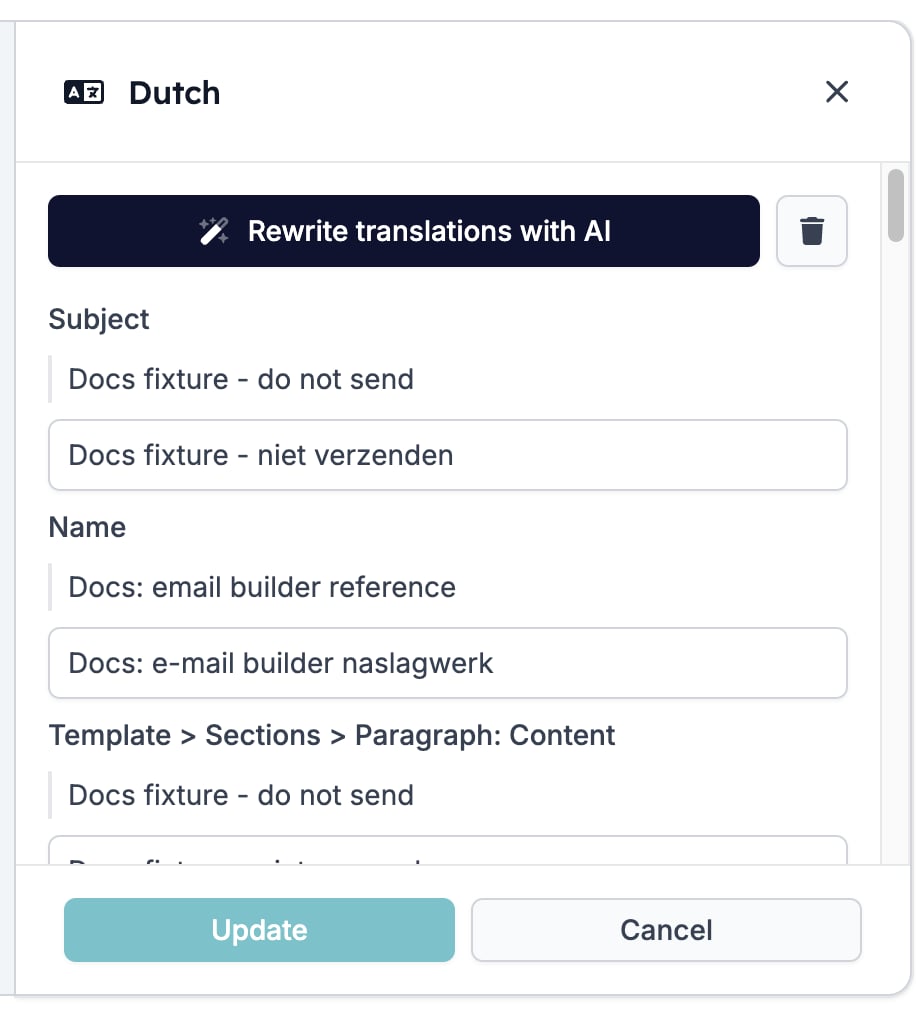 The button at the foot of the drawer saves the translation on its own, without saving the rest of the template. It reads **Create** on a new translation and **Update** on one you reopened. **Cancel** closes the drawer without saving.
## Which language a recipient gets
HireData looks for a translation in the recipient's language.
* **It finds one.** The recipient reads that translation.
* **It finds none and Auto Translate is Disabled.** The recipient reads the default language. Nothing breaks, and nothing warns you.
* **It finds none and Auto Translate is Enabled.** HireData writes the translation with AI at send time and keeps it, so the next recipient in that language gets the same wording.
Auto Translate is **Disabled** on a new template. Turn it on for an email that goes to an audience you do not control, such as a newsletter. Leave it off when the wording matters enough that you want to read it first.
The [preview](/reference/email-builder/testing) has a language picker once a template has at least one translation, and it lists the default language alongside the translations. It is the fastest way to read a translation in place.
## Changing or deleting a translation
Click a language in the **Translations** list to reopen it. The language cannot be changed, and the AI button now reads **Rewrite translations with AI**, which rewrites what is already there rather than filling in the gaps.
The bin button beside it deletes the translation. HireData asks first.
The button at the foot of the drawer saves the translation on its own, without saving the rest of the template. It reads **Create** on a new translation and **Update** on one you reopened. **Cancel** closes the drawer without saving.
## Which language a recipient gets
HireData looks for a translation in the recipient's language.
* **It finds one.** The recipient reads that translation.
* **It finds none and Auto Translate is Disabled.** The recipient reads the default language. Nothing breaks, and nothing warns you.
* **It finds none and Auto Translate is Enabled.** HireData writes the translation with AI at send time and keeps it, so the next recipient in that language gets the same wording.
Auto Translate is **Disabled** on a new template. Turn it on for an email that goes to an audience you do not control, such as a newsletter. Leave it off when the wording matters enough that you want to read it first.
The [preview](/reference/email-builder/testing) has a language picker once a template has at least one translation, and it lists the default language alongside the translations. It is the fastest way to read a translation in place.
## Changing or deleting a translation
Click a language in the **Translations** list to reopen it. The language cannot be changed, and the AI button now reads **Rewrite translations with AI**, which rewrites what is already there rather than filling in the gaps.
The bin button beside it deletes the translation. HireData asks first.
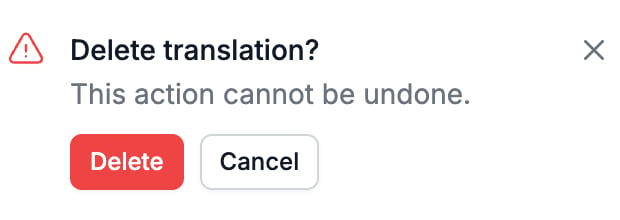 Deleting a translation does not touch the email. Recipients in that language fall back to the default language, or to a fresh AI translation if Auto Translate is on.
## Related
* [Testing](/reference/email-builder/testing) covers the preview's language picker and the test send.
* [Variables](/reference/email-builder/variables) explains the chips that survive translation.
* [Template](/reference/email-builder/template) covers the settings that apply to the email in every language.
* [Two Columns](/reference/email-builder/blocks/columns) is the block whose contents are not offered for translation.
## Related topics
- [Form builder overview](/reference/forms/overview.md)
- [File Upload](/reference/forms/fields/file-upload.md)
- [Ask for feedback in one click](/knowledge-base/cookbook/one-click-feedback-email.md)
- [Testing](/reference/email-builder/testing.md)
- [HTML](/reference/email-builder/blocks/html.md)
Deleting a translation does not touch the email. Recipients in that language fall back to the default language, or to a fresh AI translation if Auto Translate is on.
## Related
* [Testing](/reference/email-builder/testing) covers the preview's language picker and the test send.
* [Variables](/reference/email-builder/variables) explains the chips that survive translation.
* [Template](/reference/email-builder/template) covers the settings that apply to the email in every language.
* [Two Columns](/reference/email-builder/blocks/columns) is the block whose contents are not offered for translation.
## Related topics
- [Form builder overview](/reference/forms/overview.md)
- [File Upload](/reference/forms/fields/file-upload.md)
- [Ask for feedback in one click](/knowledge-base/cookbook/one-click-feedback-email.md)
- [Testing](/reference/email-builder/testing.md)
- [HTML](/reference/email-builder/blocks/html.md)