> ## Documentation Index
> Fetch the complete documentation index at: https://help.hiredata.com/llms.txt
> Use this file to discover all available pages before exploring further.
# Criteria
> Check HireData form answers against must-have and nice-to-have requirements, with answer rules or with AI, and get one verdict back per response.
Criteria answers one question about a response: does this person meet what the role needs? You mark each question you care about as a must-have or a nice-to-have, say what a good answer looks like, and HireData returns a single verdict.
It is the evaluator to reach for when some answers are disqualifying. A candidate without a driving licence cannot do a driving job, and Criteria says so without anyone reading the response.
## Switch it on
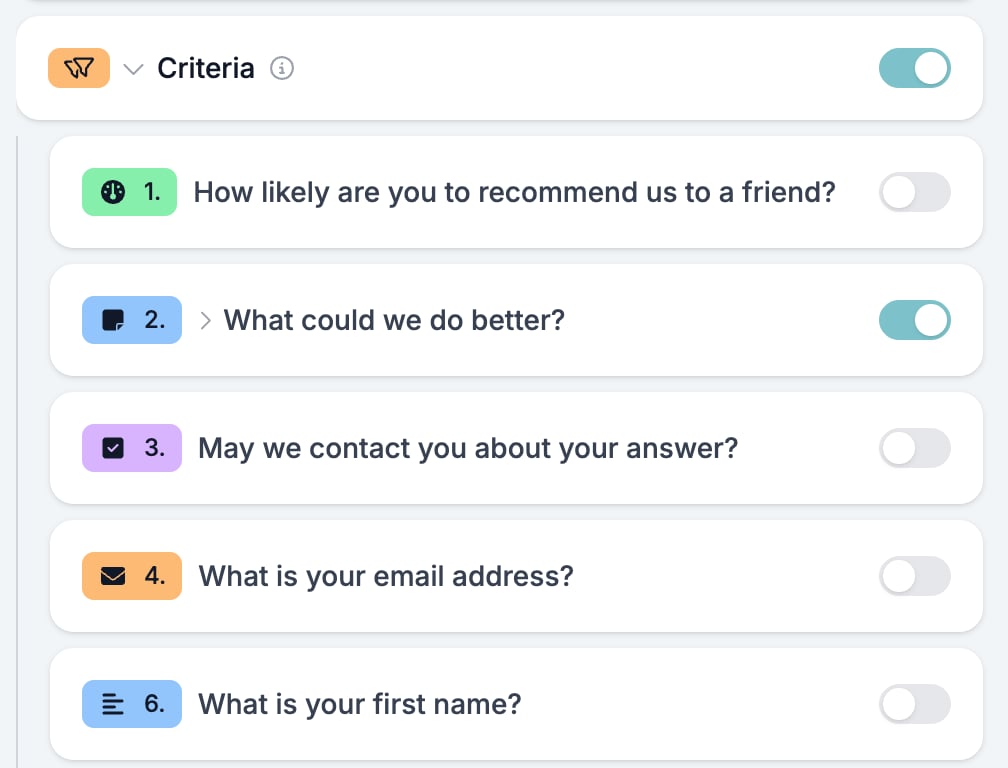
Switch **Criteria** on for the form in the [Evaluation tab](/reference/forms/evaluation/overview#enable-order), then click **Criteria** to open it. Every question in the form appears underneath with a switch of its own. A question is only checked once you switch it on here.
 ## Settings per question
Switch a question on and its settings open.
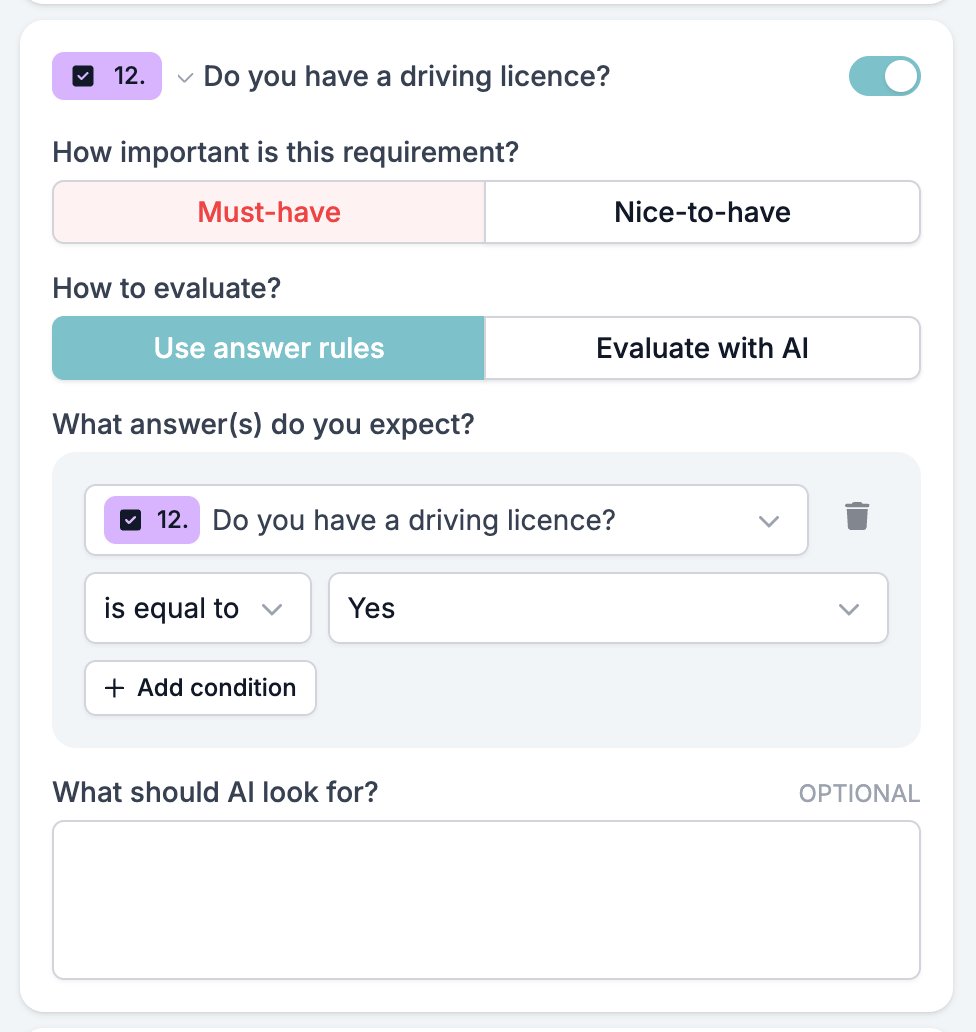
* **How important is this requirement?** with **Must-have** and **Nice-to-have**. A failed must-have rejects the response. A failed nice-to-have only downgrades it.
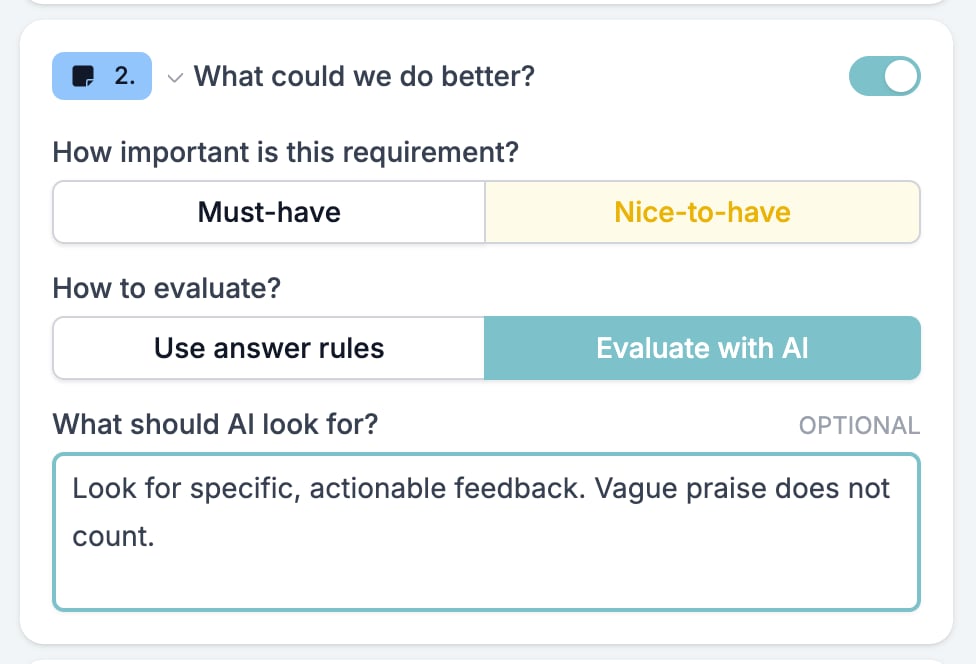
* **How to evaluate?** with **Use answer rules** and **Evaluate with AI**.
* **What answer(s) do you expect?**, on the rules side, holding the conditions the answer has to satisfy.
* The note box, labelled **What should AI look for?**. It steers the AI and is ignored by rules. See [one note per question](/reference/forms/evaluation/overview#one-note-per-question).
## Settings per question
Switch a question on and its settings open.
* **How important is this requirement?** with **Must-have** and **Nice-to-have**. A failed must-have rejects the response. A failed nice-to-have only downgrades it.
* **How to evaluate?** with **Use answer rules** and **Evaluate with AI**.
* **What answer(s) do you expect?**, on the rules side, holding the conditions the answer has to satisfy.
* The note box, labelled **What should AI look for?**. It steers the AI and is ignored by rules. See [one note per question](/reference/forms/evaluation/overview#one-note-per-question).
 ### Expected answers
A condition reads ` `. The question is fixed: a rule on this question can only test this question's answer. Pick the operator, then the value.
**Add condition** adds a second condition and an **All** and **Any** switch above it. **All** needs every condition to match. **Any** needs one. Both apply to the whole set, not to one pair.
Leave the conditions empty and the question is skipped, whatever its switch says. A question with nothing to compare cannot pass or fail.
### Expected answers
A condition reads ` `. The question is fixed: a rule on this question can only test this question's answer. Pick the operator, then the value.
**Add condition** adds a second condition and an **All** and **Any** switch above it. **All** needs every condition to match. **Any** needs one. Both apply to the whole set, not to one pair.
Leave the conditions empty and the question is skipped, whatever its switch says. A question with nothing to compare cannot pass or fail.
Operators
The type of the question decides the operators. This is a longer list than [logic](/reference/forms/logic#operators) offers, so a question logic cannot branch on can still be a criterion.
| Field types | Operators |
| ---------------------------------------------------------------------------------------------------------------------------------------------------------------------------------------------------------------------------------------------------------------------------------------------------------------------- | ------------------------------------------------------------------------------------------------------------------------------------------------ |
| [Short and Long Text](/reference/forms/fields/short-and-long-text), [Email](/reference/forms/fields/email), [Phone Number](/reference/forms/fields/phone-number), [Website](/reference/forms/fields/website) | is equal to, is not equal to, contains, does not contain, starts with, ends with, does not start with, does not end with, is empty, is not empty |
| [Number](/reference/forms/fields/number), [Currency](/reference/forms/fields/currency), [Net Promoter Score and Opinion Scale](/reference/forms/fields/net-promoter-score-and-opinion-scale), [Date](/reference/forms/fields/date), [Time](/reference/forms/fields/time), [Datetime](/reference/forms/fields/datetime) | is equal to, is not equal to, is greater than, is less than, is greater than or equal to, is less than or equal to, is empty, is not empty |
| [Multiple Choice and Dropdown](/reference/forms/fields/multiple-choice-and-dropdown) | is equal to, is not equal to, is one of, is not one of, is empty, is not empty |
| [Yes/No](/reference/forms/fields/yes-no) | is equal to, is not equal to, is empty, is not empty |
| [File Upload](/reference/forms/fields/file-upload) | text operators on the file name, its type, and its address, numeric operators on its size |
Dates are the useful surprise. The **Logic** tab can only ask whether a date was given, but a criterion can ask whether the start date falls before the day you need someone.
A File Upload question offers a second picker above the operator, for which part of the file to read: **Answer Name**, **Answer File Name**, **Answer Mime Type**, **Answer Size**, and **Answer Url**. A rule never reads what is inside the file. Only the AI does.
## Evaluating with AI
Switch to **Evaluate with AI** and the conditions disappear. The model gets the question, the answer, and your note, and decides whether the answer meets the requirement. It also returns a sentence of reasoning, which [Test & Evaluate](/reference/forms/testing/test-and-evaluate) shows under the answer.
 Use AI for free text and files, where the wording varies and no rule fits. Keep rules for answers with a fixed set of values. A Yes/No or a choice question needs no interpretation, and a rule is faster, cheaper, and repeatable.
A [File Upload](/reference/forms/fields/file-upload) question set to AI sends the attachment to the model. JPEG, PNG, GIF, WebP, and PDF files are read, up to five files and 10 MB per response. Anything else is judged on its file name alone.
## The verdict
Every question you switched on and configured votes. HireData then picks the verdict in this order.
1. **Does not meet criteria**, when an answered must-have failed.
2. **Incomplete**, when a question you switched on has no answer.
3. **Partially meets criteria**, when every must-have passed and an answered nice-to-have failed.
4. **Meets criteria**, when everything passed.
A missing answer is not a failure. A candidate who never reached a must-have question is **Incomplete**, so a rejection always means the person answered and the answer fell short. Watch for this on questions behind a [logic](/reference/forms/logic) jump, which some respondents never see.
The verdict is available to automations as `{{form_response.evaluation.screening}}`, which stores `passed`, `passed_with_restrictions`, `rejected`, or `incomplete`.
## Related
* [Form evaluation overview](/reference/forms/evaluation/overview) covers the five evaluators and the order you switch them on in.
* [Scoring](/reference/forms/evaluation/scoring) ranks the responses that pass.
* [Test & Evaluate](/reference/forms/testing/test-and-evaluate) shows the verdict per question against the answers that produced it.
* [Screen and score applicants with a pre-screening form](/knowledge-base/cookbook/pre-screening-form) builds a form around this evaluator.
## Related topics
- [Screen and score applicants with a pre-screening form](/knowledge-base/cookbook/pre-screening-form.md)
- [Form evaluation overview](/reference/forms/evaluation/overview.md)
- [Currency](/reference/forms/fields/currency.md)
- [Date](/reference/forms/fields/date.md)
- [Yes/No](/reference/forms/fields/yes-no.md)
Use AI for free text and files, where the wording varies and no rule fits. Keep rules for answers with a fixed set of values. A Yes/No or a choice question needs no interpretation, and a rule is faster, cheaper, and repeatable.
A [File Upload](/reference/forms/fields/file-upload) question set to AI sends the attachment to the model. JPEG, PNG, GIF, WebP, and PDF files are read, up to five files and 10 MB per response. Anything else is judged on its file name alone.
## The verdict
Every question you switched on and configured votes. HireData then picks the verdict in this order.
1. **Does not meet criteria**, when an answered must-have failed.
2. **Incomplete**, when a question you switched on has no answer.
3. **Partially meets criteria**, when every must-have passed and an answered nice-to-have failed.
4. **Meets criteria**, when everything passed.
A missing answer is not a failure. A candidate who never reached a must-have question is **Incomplete**, so a rejection always means the person answered and the answer fell short. Watch for this on questions behind a [logic](/reference/forms/logic) jump, which some respondents never see.
The verdict is available to automations as `{{form_response.evaluation.screening}}`, which stores `passed`, `passed_with_restrictions`, `rejected`, or `incomplete`.
## Related
* [Form evaluation overview](/reference/forms/evaluation/overview) covers the five evaluators and the order you switch them on in.
* [Scoring](/reference/forms/evaluation/scoring) ranks the responses that pass.
* [Test & Evaluate](/reference/forms/testing/test-and-evaluate) shows the verdict per question against the answers that produced it.
* [Screen and score applicants with a pre-screening form](/knowledge-base/cookbook/pre-screening-form) builds a form around this evaluator.
## Related topics
- [Screen and score applicants with a pre-screening form](/knowledge-base/cookbook/pre-screening-form.md)
- [Form evaluation overview](/reference/forms/evaluation/overview.md)
- [Currency](/reference/forms/fields/currency.md)
- [Date](/reference/forms/fields/date.md)
- [Yes/No](/reference/forms/fields/yes-no.md)