> ## Documentation Index
> Fetch the complete documentation index at: https://help.hiredata.com/llms.txt
> Use this file to discover all available pages before exploring further.
# Currency
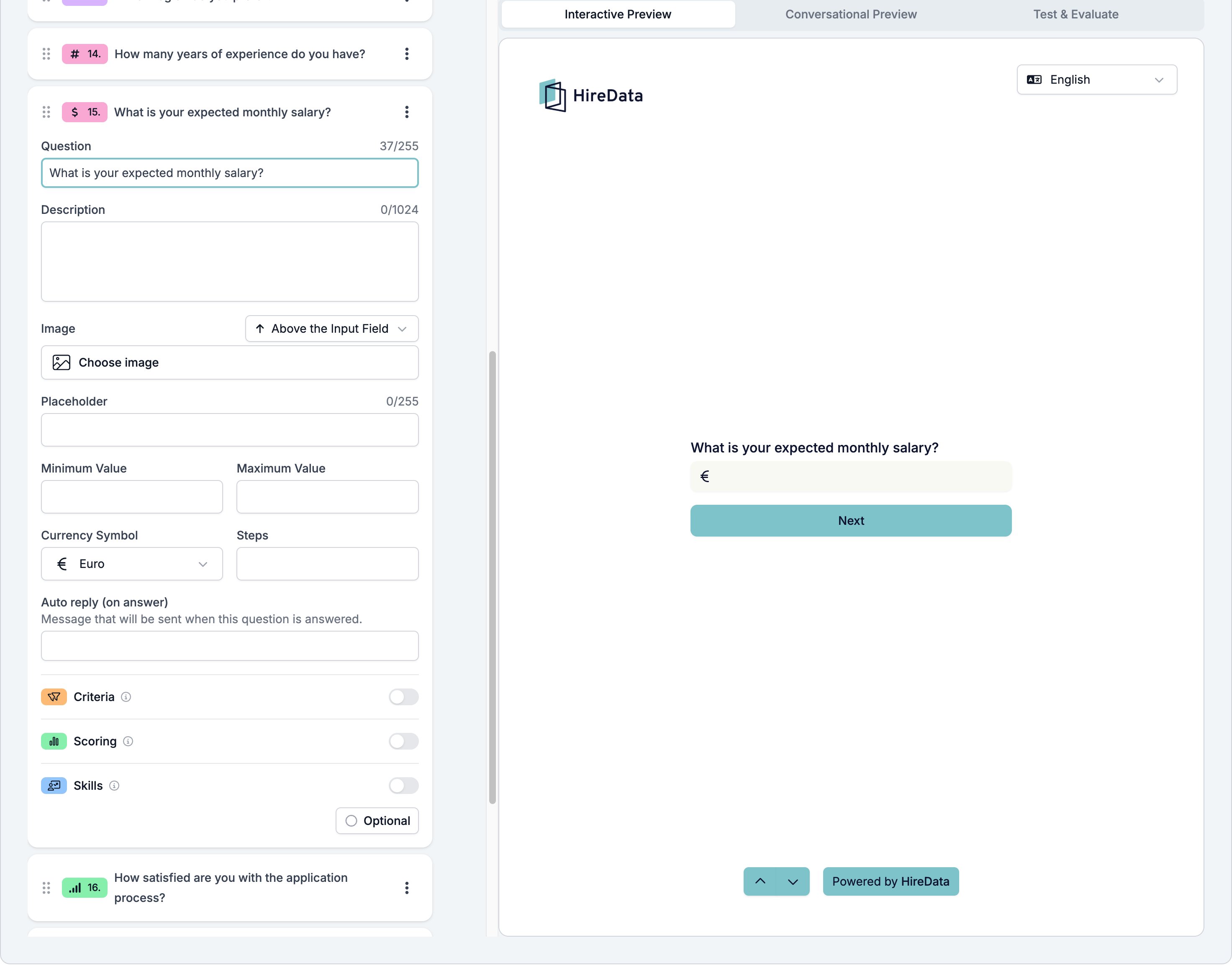
> The currency field in a HireData form. It is a number field with a symbol in front of it, offering Euro, Dollar, Pound, Swiss Franc, Yen, and Rupee.
Currency is a Number field with a symbol in front of the box. Use it for a salary expectation, an hourly rate, or a budget. Logic and the evaluators treat the answer as a plain number, so everything a Number field can do, a Currency field can do too.
It sits in the **Numeric** group of the **Add Content** palette.
## Settings
The card carries the [settings every field shares](/reference/forms/overview#settings-every-field-shares). Currency adds five of its own.
* **Placeholder**, up to 255 characters, shown in the empty box.
* **Minimum Value** and **Maximum Value**, the ends of the range you accept.
* **Currency Symbol**, one of **Euro**, **Dollar**, **Pound**, **Swiss Franc**, **Yen**, or **Rupee**.
* **Steps**, the size of one step.
The symbol is decoration on the box. HireData stores the number and does not convert between currencies, so a form that has to handle several of them needs a separate question asking which one the respondent meant.
 ## What it stores
A number, without the symbol.
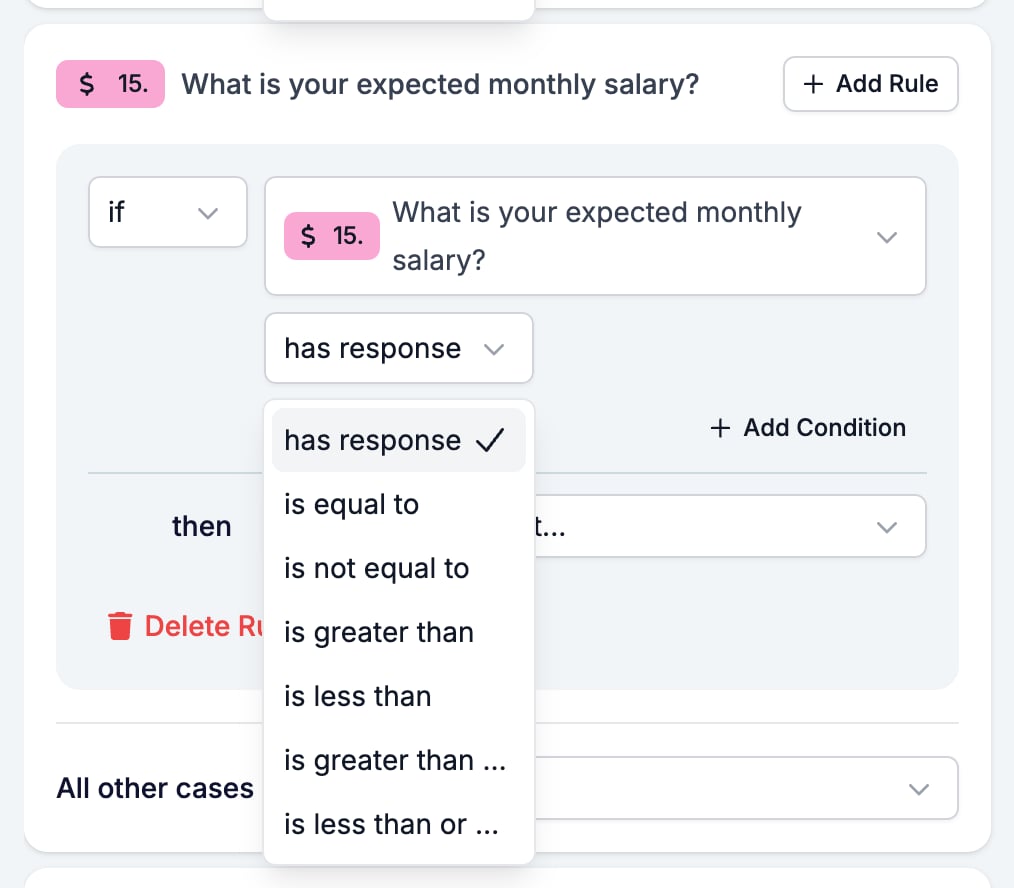
## Logic operators
| Operator | Matches when |
| --------------------------- | -------------------------------- |
| has response | the respondent answered at all |
| is equal to | the answer is exactly the value |
| is not equal to | the answer is anything else |
| is greater than | the answer is above the value |
| is less than | the answer is below the value |
| is greater than or equal to | the answer is the value or above |
| is less than or equal to | the answer is the value or below |
## What it stores
A number, without the symbol.
## Logic operators
| Operator | Matches when |
| --------------------------- | -------------------------------- |
| has response | the respondent answered at all |
| is equal to | the answer is exactly the value |
| is not equal to | the answer is anything else |
| is greater than | the answer is above the value |
| is less than | the answer is below the value |
| is greater than or equal to | the answer is the value or above |
| is less than or equal to | the answer is the value or below |
 ## Evaluation
Switch **Criteria**, **Scoring**, or **Skills** on for the form in the [Evaluation tab](/reference/forms/evaluation/overview) and each one gets a switch on this card. A salary ceiling is a sensible **Criteria** must-have: above the number, the candidate is out of range.
## Related
* [Form builder overview](/reference/forms/overview) covers the builder, the shared settings, and every field type.
* [Logic](/reference/forms/logic) covers the operators, the branching patterns, and what to check when a rule does not fire.
* [Number](/reference/forms/fields/number) is the same field without a symbol.
## Related topics
- [Modifiers](/variables/modifiers.md)
- [AI variables](/variables/ai-variables.md)
- [Number](/reference/forms/fields/number.md)
- [Logic](/reference/forms/logic.md)
- [Criteria](/reference/forms/evaluation/criteria.md)
## Evaluation
Switch **Criteria**, **Scoring**, or **Skills** on for the form in the [Evaluation tab](/reference/forms/evaluation/overview) and each one gets a switch on this card. A salary ceiling is a sensible **Criteria** must-have: above the number, the candidate is out of range.
## Related
* [Form builder overview](/reference/forms/overview) covers the builder, the shared settings, and every field type.
* [Logic](/reference/forms/logic) covers the operators, the branching patterns, and what to check when a rule does not fire.
* [Number](/reference/forms/fields/number) is the same field without a symbol.
## Related topics
- [Modifiers](/variables/modifiers.md)
- [AI variables](/variables/ai-variables.md)
- [Number](/reference/forms/fields/number.md)
- [Logic](/reference/forms/logic.md)
- [Criteria](/reference/forms/evaluation/criteria.md)