> ## Documentation Index
> Fetch the complete documentation index at: https://help.hiredata.com/llms.txt
> Use this file to discover all available pages before exploring further.
# Net Promoter Score and Opinion Scale
> The rating field in a HireData form. Net Promoter Score is a fixed 0 to 10 scale, and Opinion Scale lets you set the ends and label them.
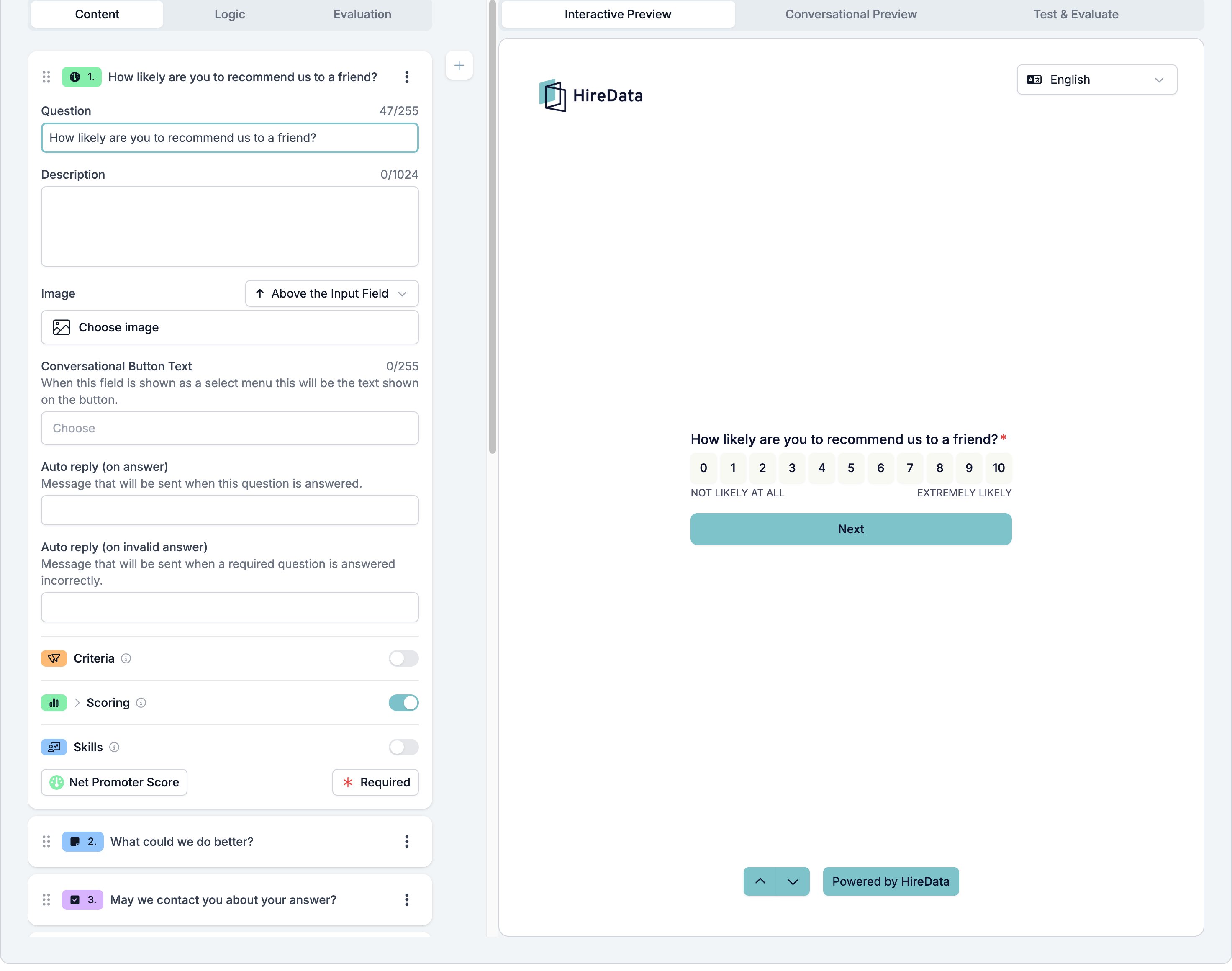
Net Promoter Score and Opinion Scale are one field type with a switch between them. The respondent picks a point on a row of numbers, and the form stores the number they picked.
**Net Promoter Score** is the standard question, fixed at 0 to 10, with **NOT LIKELY AT ALL** under one end and **EXTREMELY LIKELY** under the other. You cannot change the range or the labels.
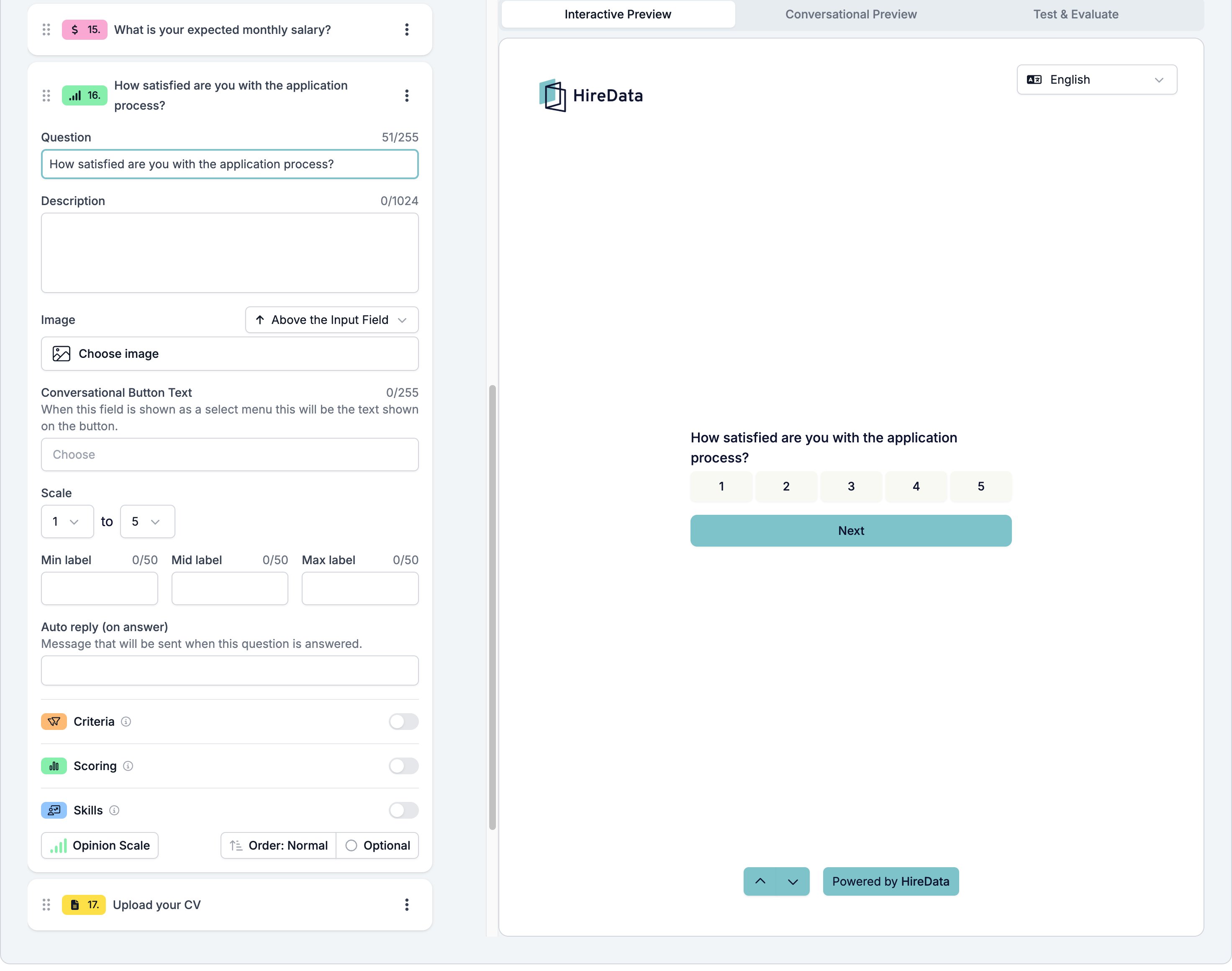
**Opinion Scale** is the same row with the ends and the labels in your hands. Use it for satisfaction, confidence, or any rating where 0 to 10 is more room than the question needs.
Both sit in the **Rating** group of the **Add Content** palette. The button at the bottom left of the card switches between them.
## Settings
The card carries the [settings every field shares](/reference/forms/overview#settings-every-field-shares). Net Promoter Score adds one setting of its own.
* **Conversational Button Text**, the label on the button that opens the scale in a WhatsApp conversation.
Opinion Scale adds four more.
* **Scale**, the first and last point. The first is **0** or **1**, and the last goes up to **10**.
* **Min label**, **Mid label**, and **Max label**, up to 50 characters each, printed under the start, middle, and end of the row.
* The footer button reading **Order: Normal** opens **Rating order**, which holds one switch, **Reverse order**, described as "Show rating options from highest to lowest."
 The same type switched to Opinion Scale, which adds the **Scale** and label settings:
 ## What it stores
A number, the point the respondent picked.
## Logic operators
| Operator | Matches when |
| --------------------------- | -------------------------------- |
| has response | the respondent answered at all |
| is equal to | the answer is exactly the value |
| is not equal to | the answer is anything else |
| is greater than | the answer is above the value |
| is less than | the answer is below the value |
| is greater than or equal to | the answer is the value or above |
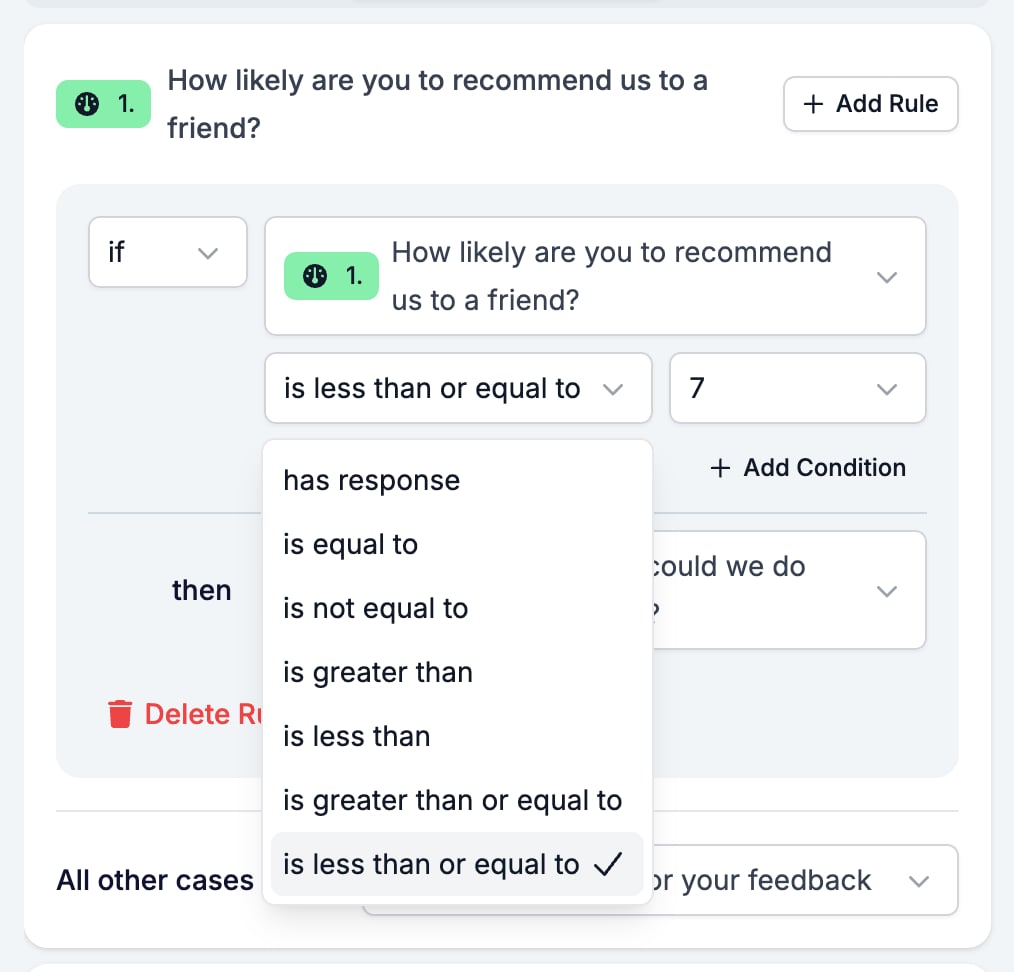
| is less than or equal to | the answer is the value or below |
A rating is the field most worth branching on. `if score is less than or equal to 7 then go to "What could we do better?"` sends the unhappy respondents down a follow-up path and lets everyone else finish.
## What it stores
A number, the point the respondent picked.
## Logic operators
| Operator | Matches when |
| --------------------------- | -------------------------------- |
| has response | the respondent answered at all |
| is equal to | the answer is exactly the value |
| is not equal to | the answer is anything else |
| is greater than | the answer is above the value |
| is less than | the answer is below the value |
| is greater than or equal to | the answer is the value or above |
| is less than or equal to | the answer is the value or below |
A rating is the field most worth branching on. `if score is less than or equal to 7 then go to "What could we do better?"` sends the unhappy respondents down a follow-up path and lets everyone else finish.
 A required rating field blocks the answer 0. The respondent picks 0, the form does not move on, **Next** does nothing, and no message appears. Net Promoter Score always starts at 0, so leave it optional. An Opinion Scale can start at 1 instead, which avoids the problem.
## Evaluation
Switch **Criteria**, **Scoring**, or **Skills** on for the form in the [Evaluation tab](/reference/forms/evaluation/overview) and each one gets a switch on this card.
A rating and **Scoring** fit together: 9 or 10 earns full points, 7 or 8 earns some, and the rest earn none.
## Related
* [Form builder overview](/reference/forms/overview) covers the builder, the shared settings, and every field type.
* [Logic](/reference/forms/logic) covers the operators, the branching patterns, and what to check when a rule does not fire.
* [Number](/reference/forms/fields/number) is the field to use for a number the respondent types.
* [Multiple Choice and Dropdown](/reference/forms/fields/multiple-choice-and-dropdown) is the field to use for named answers rather than a scale.
## Related topics
- [Number](/reference/forms/fields/number.md)
- [Form builder overview](/reference/forms/overview.md)
- [Logic](/reference/forms/logic.md)
- [Criteria](/reference/forms/evaluation/criteria.md)
- [Screen and score applicants with a pre-screening form](/knowledge-base/cookbook/pre-screening-form.md)
A required rating field blocks the answer 0. The respondent picks 0, the form does not move on, **Next** does nothing, and no message appears. Net Promoter Score always starts at 0, so leave it optional. An Opinion Scale can start at 1 instead, which avoids the problem.
## Evaluation
Switch **Criteria**, **Scoring**, or **Skills** on for the form in the [Evaluation tab](/reference/forms/evaluation/overview) and each one gets a switch on this card.
A rating and **Scoring** fit together: 9 or 10 earns full points, 7 or 8 earns some, and the rest earn none.
## Related
* [Form builder overview](/reference/forms/overview) covers the builder, the shared settings, and every field type.
* [Logic](/reference/forms/logic) covers the operators, the branching patterns, and what to check when a rule does not fire.
* [Number](/reference/forms/fields/number) is the field to use for a number the respondent types.
* [Multiple Choice and Dropdown](/reference/forms/fields/multiple-choice-and-dropdown) is the field to use for named answers rather than a scale.
## Related topics
- [Number](/reference/forms/fields/number.md)
- [Form builder overview](/reference/forms/overview.md)
- [Logic](/reference/forms/logic.md)
- [Criteria](/reference/forms/evaluation/criteria.md)
- [Screen and score applicants with a pre-screening form](/knowledge-base/cookbook/pre-screening-form.md)