> ## Documentation Index
> Fetch the complete documentation index at: https://help.hiredata.com/llms.txt
> Use this file to discover all available pages before exploring further.
# Phone Number
> The phone number field in a HireData form, with the placeholder, length, and validation pattern settings a text field has, and how to enforce a format.
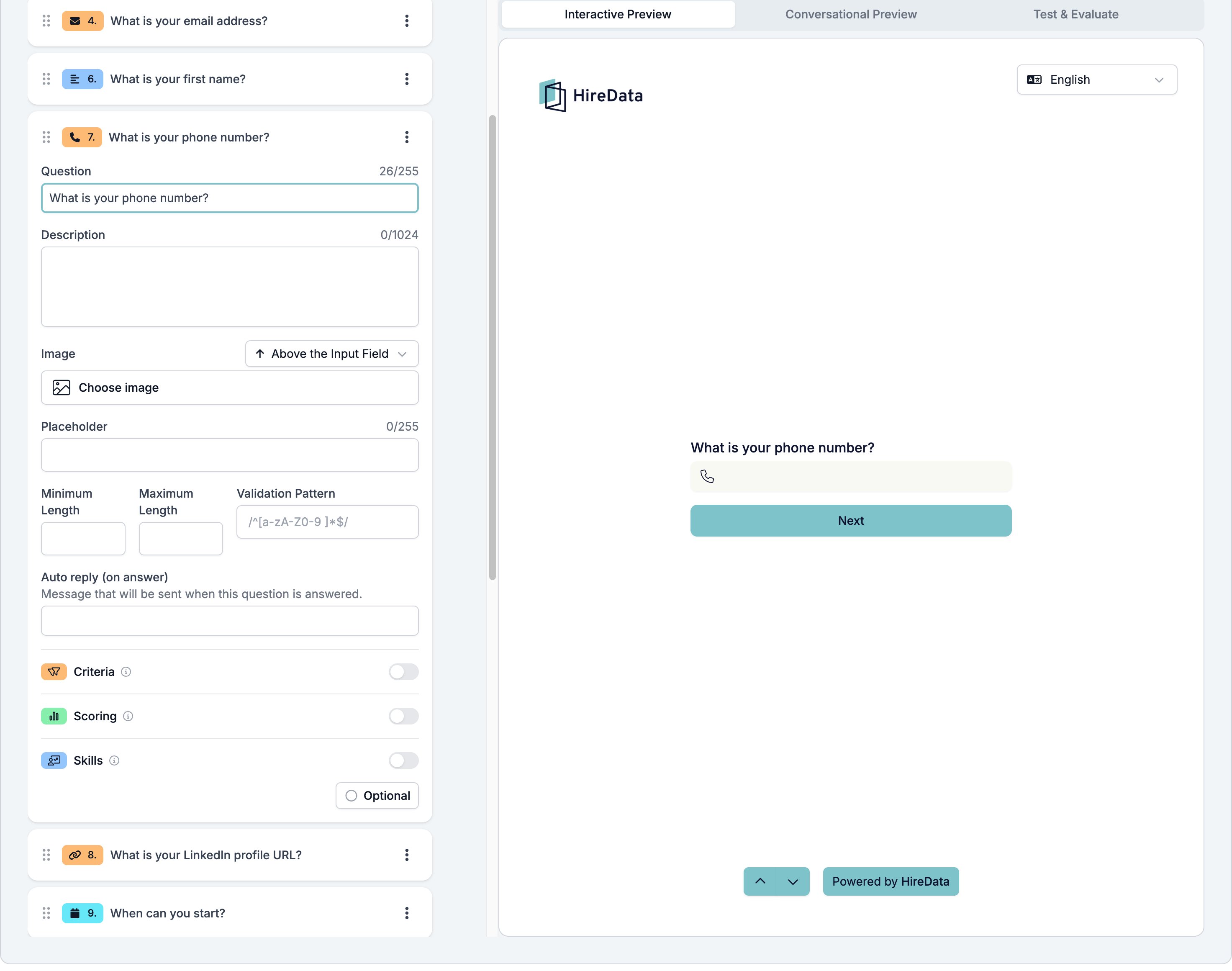
Phone Number is a single-line box for a telephone number. The respondent sees a handset mark in the empty box.
It sits in the **Contact Info** group of the **Add Content** palette.
## Settings
The card carries the [settings every field shares](/reference/forms/overview#settings-every-field-shares). Phone Number adds the same four a text field has.
* **Placeholder**, up to 255 characters, shown in the empty box.
* **Minimum Length** and **Maximum Length**, counted in characters.
* **Validation Pattern**, a regular expression the answer has to match.
There is no phone-specific validation message, so **Validation Pattern** is how you insist on a format. If your process needs numbers in international form, ask for it in the **Description** and back it with a pattern.
 ## What it stores
Text, the number as the respondent typed it. HireData does not reformat it.
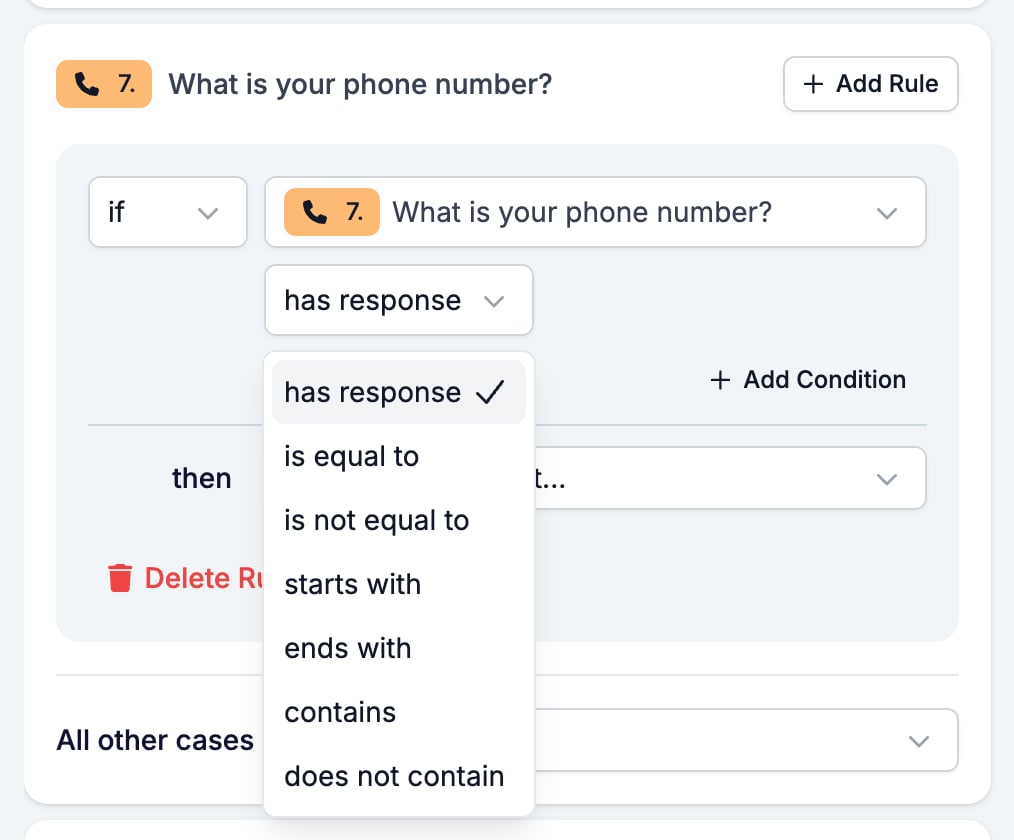
## Logic operators
| Operator | Matches when |
| ---------------- | ----------------------------------------- |
| has response | the respondent answered at all |
| is equal to | the answer is exactly the value |
| is not equal to | the answer is anything else |
| starts with | the answer begins with the value |
| ends with | the answer ends with the value |
| contains | the value appears somewhere in the answer |
| does not contain | the value appears nowhere in the answer |
## What it stores
Text, the number as the respondent typed it. HireData does not reformat it.
## Logic operators
| Operator | Matches when |
| ---------------- | ----------------------------------------- |
| has response | the respondent answered at all |
| is equal to | the answer is exactly the value |
| is not equal to | the answer is anything else |
| starts with | the answer begins with the value |
| ends with | the answer ends with the value |
| contains | the value appears somewhere in the answer |
| does not contain | the value appears nowhere in the answer |
 ## Evaluation
Switch **Criteria**, **Scoring**, or **Skills** on for the form in the [Evaluation tab](/reference/forms/evaluation/overview) and each one gets a switch on this card. A number is rarely worth evaluating, so most forms leave all three off here.
## Related
* [Form builder overview](/reference/forms/overview) covers the builder, the shared settings, and every field type.
* [Logic](/reference/forms/logic) covers the operators, the branching patterns, and what to check when a rule does not fire.
* [Email](/reference/forms/fields/email) and [Website](/reference/forms/fields/website) are the other two Contact Info fields.
* [How to use forms in WhatsApp conversations](/apps/messaging/whatsapp/how-to-use-forms-in-whatsapp-conversations) explains where the auto replies go.
## Related topics
- [Buy a phone number from Numero for your WhatsApp account](/apps/messaging/whatsapp/buy-a-phone-number-from-numero-for-your-whatsapp-account.md)
- [Combined fields explained: how HireData picks a value](/apps/carerix/combined-fields-explained.md)
- [Connect with WhatsApp: Embedded sign-up](/apps/messaging/whatsapp/connect-with-whatsapp-embedded-sign-up.md)
- [WhatsApp error codes explained](/apps/messaging/whatsapp/whatsapp-error-codes-explained.md)
- [Prevent your WhatsApp account from being flagged as spam](/apps/messaging/whatsapp/how-to-prevent-your-whatsapp-account-from-being-flagged-as-spam.md)
## Evaluation
Switch **Criteria**, **Scoring**, or **Skills** on for the form in the [Evaluation tab](/reference/forms/evaluation/overview) and each one gets a switch on this card. A number is rarely worth evaluating, so most forms leave all three off here.
## Related
* [Form builder overview](/reference/forms/overview) covers the builder, the shared settings, and every field type.
* [Logic](/reference/forms/logic) covers the operators, the branching patterns, and what to check when a rule does not fire.
* [Email](/reference/forms/fields/email) and [Website](/reference/forms/fields/website) are the other two Contact Info fields.
* [How to use forms in WhatsApp conversations](/apps/messaging/whatsapp/how-to-use-forms-in-whatsapp-conversations) explains where the auto replies go.
## Related topics
- [Buy a phone number from Numero for your WhatsApp account](/apps/messaging/whatsapp/buy-a-phone-number-from-numero-for-your-whatsapp-account.md)
- [Combined fields explained: how HireData picks a value](/apps/carerix/combined-fields-explained.md)
- [Connect with WhatsApp: Embedded sign-up](/apps/messaging/whatsapp/connect-with-whatsapp-embedded-sign-up.md)
- [WhatsApp error codes explained](/apps/messaging/whatsapp/whatsapp-error-codes-explained.md)
- [Prevent your WhatsApp account from being flagged as spam](/apps/messaging/whatsapp/how-to-prevent-your-whatsapp-account-from-being-flagged-as-spam.md)