Award points for form answers with rules or with AI, turn the total into a percentage, and label it with a score range such as Low, Medium, or High.
Scoring turns a response into a number. You decide how many points each question is worth and when they are awarded, and HireData converts the total into a percentage and labels it with a range.Criteria tells you who is out. Scoring tells you who to call first.
Switch Scoring on for the form and it starts with three ranges: Low at 0, Medium at 50, and High at 80. Click Scoring to open them.Each range has a Label and a Minimum score (%). A response lands in the highest range whose minimum it clears, so 82% is High and 79% is Medium. Add range adds another, and the bin removes one. Give every range a label and a different minimum between 0 and 100.Keep one range at 0. A score below every minimum gets a percentage and no label, which reads as a missing result rather than a low one.
A rule is a set of conditions plus How many points should be awarded?. A condition reads <question> <operator> <value> and can only test this question’s answer. Add condition adds a second one and an All and Any switch above it, and Add rule adds another rule underneath.The operators are the same set Criteria offers, and the field type decides them. Text and contact types use text operators, and numeric, rating, and date types use comparisons. Multiple Choice and Dropdown use is one of, and File Upload uses file metadata operators. See the operator table.Every matching rule pays out, and the total is then capped at the question’s maximum. Two rules that both match a five-year answer, one worth 20 and one worth 10, award 20 on a question worth 20. Overlapping bands are safe as long as the maximum is right. That is what lets you write “5 years or more, 20 points” above “3 years or more, 10 points” and stop thinking about the gap.Leave How many points is this question worth? empty and the maximum becomes the sum of the rule points, so nothing can go over 100%.
Switch to Evaluate with AI and the rules disappear. The model reads the answer and your note and returns a number between zero and the question’s maximum, with a sentence of reasoning.
Set the maximum before switching a question to AI. AI scoring needs a maximum above zero, and the whole evaluation fails with an error while it is empty.
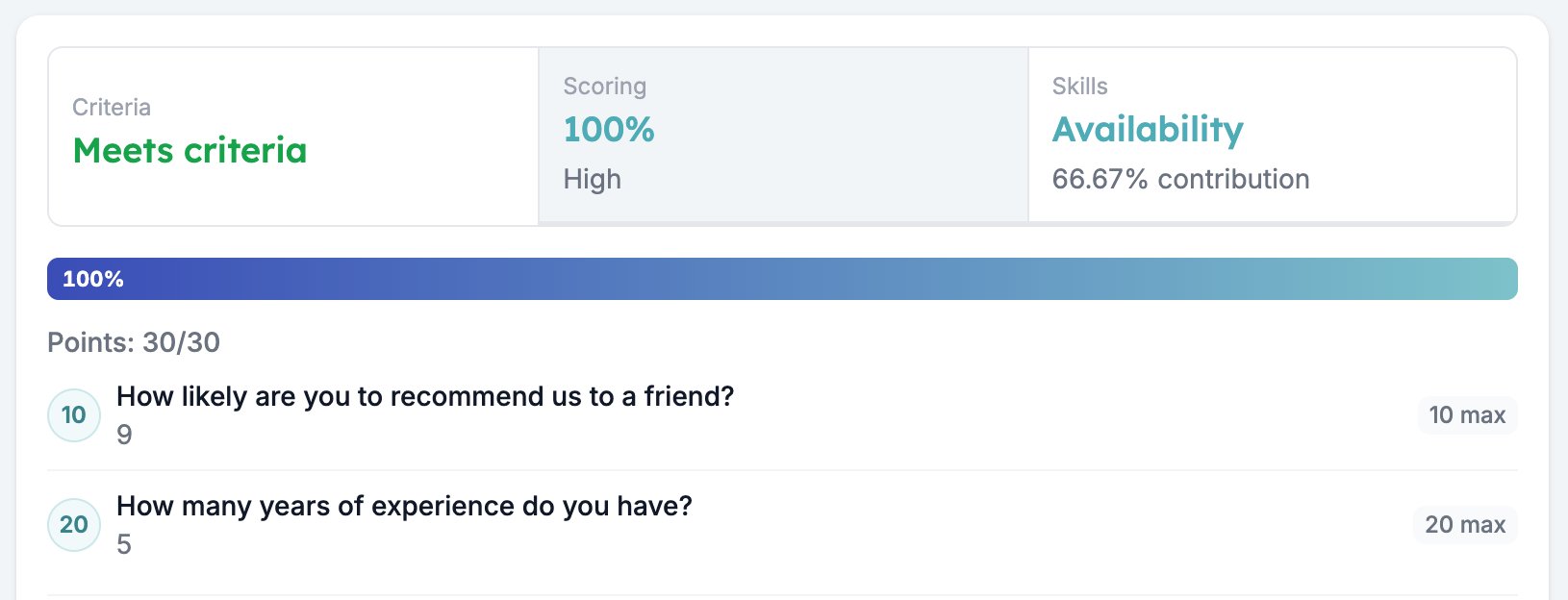
Only the questions you switched on and configured take part. HireData adds up the points they earned, divides by the sum of their maximums, and rounds to two decimals.A form with a 10-point question and a 20-point question is scored out of 30. Earn 10 and 20 and the response scores 100%.An unanswered question scores zero and still counts its maximum, so a half-finished response scores low rather than scoring well on what it did answer. That is usually what you want. When it is not, put the scored questions early in the form, ahead of any logic jump that could step over them.Automations read the result as {{form_response.evaluation.scoring.score}} for the percentage, and {{form_response.evaluation.scoring.band.label}} for the range label.
{"docsConfig":{"theme":"mint","$schema":"https://mintlify.com/docs.json","name":"HireData Docs","description":"Guides, how to's, and answers to your questions about HireData","colors":{"primary":"#7DC2CA","light":"#B1DADF","dark":"#39838B"},"logo":{"light":"https://mintcdn.com/hiredata/Pii9WVdQv6Pc1yMR/logo/light.svg?fit=max\u0026auto=format\u0026n=Pii9WVdQv6Pc1yMR\u0026q=85\u0026s=db078cfb402d8486f2a0b75131261055","dark":"https://mintcdn.com/hiredata/Pii9WVdQv6Pc1yMR/logo/dark.svg?fit=max\u0026auto=format\u0026n=Pii9WVdQv6Pc1yMR\u0026q=85\u0026s=b96e04b3cab0350c812239aed8483a1d"},"favicon":"https://mintcdn.com/hiredata/Pii9WVdQv6Pc1yMR/favicon.svg?fit=max\u0026auto=format\u0026n=Pii9WVdQv6Pc1yMR\u0026q=85\u0026s=7443bc080236de4a0bb1b66812a1a1fc","background":{"color":{"light":"#FAFAF5","dark":"#0F132F"}},"navbar":{"links":[{"href":"mailto:support@hiredata.com","label":"Support"}],"primary":{"type":"button","label":"Dashboard","href":"https://dashboard.mintlify.com"}},"footer":{"socials":{"linkedin":"https://linkedin.com/company/hiredata"}},"fonts":{"heading":{"family":"Lexend"}},"icons":{"library":"fontawesome"},"styling":{"eyebrows":"section","latex":true},"integrations":{},"contextual":{"options":["copy","view","chatgpt","claude","perplexity","mcp","cursor","vscode"],"display":"header"},"thumbnails":{"appearance":"light"},"interaction":{"drilldown":true},"navigation":{"languages":[{"language":"en","href":""},{"language":"nl","href":"nl"},{"language":"pt","href":"pt"},{"language":"de","href":"de"},{"language":"fr","href":"fr"}]}},"deployment":{"deploymentMetadataValue":{"subdomain":"hiredata","hasAudioNarration":false,"actualSubdomain":"hiredata","customDomains":["help.hiredata.com"],"gitSource":{"type":"github","owner":"hiredata","repo":"documentation","deployBranch":"main","isPrivate":false,"contentDirectory":"","mountPath":"","label":""},"chroma":{"liveDeploymentHistoryId":"6ad822be00ee183f0811e9c4","collectionId":"0e6df5ac-83a2-483e-b8b5-2d01990f27a1","schemaVersion":"v3","latestBuiltDeploymentHistoryId":"6ad822be00ee183f0811e9c4"},"feedback":{"thumbs":true,"agentFeedback":true},"entitlements":{"AI_CHAT":{"status":"DISABLED"},"WEB_MCP":{"status":"ENABLED"},"NARRATION":{"status":"DISABLED"}},"buildId":"6ad822be00ee183f0811e9c4","clientVersion":"0.0.4043","searchFilterCounts":[{"language":"en","tag":"Reference","count":59},{"language":"de","tag":"Referenz","count":59},{"language":"fr","tag":"Référence","count":59},{"language":"nl","tag":"Referentie","count":59},{"language":"pt","tag":"Referência","count":59},{"language":"en","tag":"Integrations","count":46},{"language":"de","tag":"Integrationen","count":46},{"language":"de","tag":"Carerix","count":46},{"language":"fr","tag":"Intégrations","count":46},{"language":"fr","tag":"Carerix","count":46},{"language":"nl","tag":"Integraties","count":46},{"language":"nl","tag":"Carerix","count":46},{"language":"pt","tag":"Integrações","count":46},{"language":"pt","tag":"Carerix","count":46},{"language":"en","tag":"Documentation","count":37},{"language":"de","tag":"Dokumentation","count":37},{"language":"fr","tag":"Documentation","count":37},{"language":"nl","tag":"Documentatie","count":37},{"language":"pt","tag":"Documentação","count":37},{"language":"de","tag":"Einrichtung","count":34},{"language":"fr","tag":"Configuration","count":34},{"language":"nl","tag":"Installatie","count":34},{"language":"pt","tag":"Configuração","count":34},{"language":"en","tag":"ATS","count":31},{"language":"en","tag":"Forms","count":26},{"language":"de","tag":"Formulare","count":26},{"language":"fr","tag":"Formulaires","count":26},{"language":"nl","tag":"Formulieren","count":26},{"language":"pt","tag":"Formulários","count":26},{"language":"en","tag":"Automations","count":19},{"language":"de","tag":"Automatisierungen","count":19},{"language":"fr","tag":"Automatisations","count":19},{"language":"nl","tag":"Automatiseringen","count":19},{"language":"en","tag":"Messaging","count":17},{"language":"en","tag":"Carerix","count":15},{"language":"en","tag":"Knowledge Base","count":15},{"language":"en","tag":"Emails","count":15},{"language":"de","tag":"Wissensdatenbank","count":15},{"language":"de","tag":"E-Mails","count":15},{"language":"de","tag":"Formularfelder","count":15},{"language":"fr","tag":"Base de connaissances","count":15},{"language":"fr","tag":"E-mails","count":15},{"language":"fr","tag":"Champs de formulaire","count":15},{"language":"nl","tag":"Kennisbank","count":15},{"language":"nl","tag":"E-mails","count":15},{"language":"nl","tag":"Formuliervelden","count":15},{"language":"pt","tag":"Base de conhecimento","count":15},{"language":"pt","tag":"Automatizações","count":15},{"language":"pt","tag":"Emails","count":15},{"language":"pt","tag":"Campos de formulário","count":15}]},"assistantConfig":{"enableAskAiButton":false,"enableStarterQuestions":true,"enableContextualStarterQuestions":true,"enableAskAiSearchBar":true,"deflection":{"enabled":true,"email":"support@hiredata.com"}},"basePath":"","hasChatPermissions":false,"hasWebMcpPermissions":true,"toggles":[{"name":"kill-isr","enabled":true,"variant":{"name":"disabled","enabled":false,"feature_enabled":true},"impressionData":false},{"name":"agent-mintlify-slack","enabled":true,"variant":{"name":"disabled","enabled":false,"feature_enabled":true},"impressionData":false},{"name":"agent-integrations-settings","enabled":true,"variant":{"name":"disabled","enabled":false,"feature_enabled":true},"impressionData":false},{"name":"automations-pr-grouping","enabled":true,"variant":{"name":"disabled","enabled":false,"feature_enabled":true},"impressionData":false},{"name":"custom-prefix","enabled":true,"variant":{"name":"disabled","enabled":false,"feature_enabled":true},"impressionData":false},{"name":"analytics-v7","enabled":true,"variant":{"name":"disabled","enabled":false,"feature_enabled":true},"impressionData":false},{"name":"user-flows-analytics","enabled":true,"variant":{"name":"disabled","enabled":false,"feature_enabled":true},"impressionData":false},{"name":"no-publish-flow","enabled":true,"variant":{"name":"disabled","enabled":false,"feature_enabled":true},"impressionData":false},{"name":"workos-onboarding","enabled":true,"variant":{"name":"disabled","enabled":false,"feature_enabled":true},"impressionData":false},{"name":"llms-txt-v2","enabled":true,"variant":{"name":"disabled","enabled":false,"feature_enabled":true},"impressionData":false},{"name":"snapshot-serving-live","enabled":true,"variant":{"name":"disabled","enabled":false,"feature_enabled":true},"impressionData":false},{"name":"stripTemperatureMiddleware","enabled":true,"variant":{"name":"disabled","enabled":false,"feature_enabled":true},"impressionData":false},{"name":"support-platform-pylon-zendesk","enabled":true,"variant":{"name":"disabled","enabled":false,"feature_enabled":true},"impressionData":false},{"name":"snapshot-serving","enabled":true,"variant":{"name":"disabled","enabled":false,"feature_enabled":true},"impressionData":false},{"name":"instant-rollback","enabled":true,"variant":{"name":"disabled","enabled":false,"feature_enabled":true},"impressionData":false},{"name":"granular-notifications-server","enabled":true,"variant":{"name":"disabled","enabled":false,"feature_enabled":true},"impressionData":false},{"name":"granular-notifications","enabled":true,"variant":{"name":"disabled","enabled":false,"feature_enabled":true},"impressionData":false},{"name":"automations-fable","enabled":true,"variant":{"name":"disabled","enabled":false,"feature_enabled":true},"impressionData":false},{"name":"fixed-ai-action-pricing","enabled":true,"variant":{"name":"disabled","enabled":false,"feature_enabled":true},"impressionData":false},{"name":"automation-resolve-merge-conflict","enabled":true,"variant":{"name":"disabled","enabled":false,"feature_enabled":true},"impressionData":false},{"name":"scoped-publishing","enabled":true,"variant":{"name":"disabled","enabled":false,"feature_enabled":true},"impressionData":false},{"name":"mintql","enabled":true,"variant":{"name":"disabled","enabled":false,"feature_enabled":true},"impressionData":false},{"name":"page-level-analytics","enabled":true,"variant":{"name":"disabled","enabled":false,"feature_enabled":true},"impressionData":false},{"name":"editor-version-history-v2","enabled":true,"variant":{"name":"disabled","enabled":false,"feature_enabled":true},"impressionData":false},{"name":"billing-page-v2","enabled":true,"variant":{"name":"disabled","enabled":false,"feature_enabled":true},"impressionData":false},{"name":"full-page-search","enabled":true,"variant":{"name":"disabled","enabled":false,"feature_enabled":true},"impressionData":false},{"name":"workspace-projects","enabled":true,"variant":{"name":"disabled","enabled":false,"feature_enabled":true},"impressionData":false},{"name":"assistant-v5","enabled":true,"variant":{"name":"disabled","enabled":false,"feature_enabled":true},"impressionData":false},{"name":"byok-sep-25","enabled":true,"variant":{"name":"disabled","enabled":false,"feature_enabled":true},"impressionData":false},{"name":"fork-pr-previews","enabled":true,"variant":{"name":"disabled","enabled":false,"feature_enabled":true},"impressionData":false},{"name":"revalidation-jwt","enabled":true,"variant":{"name":"disabled","enabled":false,"feature_enabled":true},"impressionData":false},{"name":"vite-origin","enabled":true,"variant":{"name":"disabled","enabled":false,"feature_enabled":true},"impressionData":false},{"name":"billing-updated-9-15","enabled":true,"variant":{"name":"disabled","enabled":false,"feature_enabled":true},"impressionData":false},{"name":"workos-sso-scim","enabled":true,"variant":{"name":"disabled","enabled":false,"feature_enabled":true},"impressionData":false},{"name":"hobby-abuse-scan","enabled":true,"variant":{"name":"disabled","enabled":false,"feature_enabled":true},"impressionData":false},{"name":"dashboard-inbox","enabled":true,"variant":{"name":"disabled","enabled":false,"feature_enabled":true},"impressionData":false},{"name":"workos-signup","enabled":true,"variant":{"name":"disabled","enabled":false,"feature_enabled":true},"impressionData":false},{"name":"turbopuffer-dual-write","enabled":true,"variant":{"name":"disabled","enabled":false,"feature_enabled":true},"impressionData":false},{"name":"workos-enabled","enabled":true,"variant":{"name":"disabled","enabled":false,"feature_enabled":true},"impressionData":false},{"name":"approve-review-flow","enabled":true,"variant":{"name":"disabled","enabled":false,"feature_enabled":true},"impressionData":false}],"googleFontsInlined":true},"customCss":[],"page":{"pagePath":"reference/forms/evaluation/scoring","slug":"/reference/forms/evaluation/scoring","pageMetadata":{"title":"Scoring","sidebarTitle":"Scoring","description":"Award points for form answers with rules or with AI, turn the total into a percentage, and label it with a score range such as Low, Medium, or High.","keywords":["form scoring","points","score range","rating","weighting answers","candidate score"],"href":"/reference/forms/evaluation/scoring"},"description":{"compiledSource":"\"use strict\";\nconst {jsx: _jsx} = arguments[0];\nconst {useMDXComponents: _provideComponents} = arguments[0];\nfunction _createMdxContent(props) {\n const _components = {\n p: \"p\",\n ..._provideComponents(),\n ...props.components\n };\n return _jsx(_components.p, {\n children: \"Award points for form answers with rules or with AI, turn the total into a percentage, and label it with a score range such as Low, Medium, or High.\"\n });\n}\nfunction MDXContent(props = {}) {\n const {wrapper: MDXLayout} = {\n ..._provideComponents(),\n ...props.components\n };\n return MDXLayout ? _jsx(MDXLayout, {\n ...props,\n children: _jsx(_createMdxContent, {\n ...props\n })\n }) : _createMdxContent(props);\n}\nreturn {\n default: MDXContent\n};\n","frontmatter":{},"scope":{}},"pageType":"default","mdx":{"mdxSource":{"compiledSource":"\"use strict\";const{Fragment:_Fragment,jsx:_jsx,jsxs:_jsxs}=arguments[0];const{useMDXComponents:_provideComponents}=arguments[0];function _createMdxContent(props){const _components={a:`a`,code:`code`,li:`li`,p:`p`,strong:`strong`,ul:`ul`,..._provideComponents(),...props.components},{Heading,OptimizedImage,Warning}=_components;if(!Heading)_missingMdxReference(`Heading`,true);if(!OptimizedImage)_missingMdxReference(`OptimizedImage`,true);if(!Warning)_missingMdxReference(`Warning`,true);return _jsxs(_Fragment,{children:[_jsx(_components.p,{children:`Scoring turns a response into a number. You decide how many points each question is worth and when they are awarded, and HireData converts the total into a percentage and labels it with a range.`}),`\n`,_jsx(_components.p,{children:`Criteria tells you who is out. Scoring tells you who to call first.`}),`\n`,_jsx(Heading,{level:`2`,id:`score-ranges`,children:`Score ranges`}),`\n`,_jsxs(_components.p,{children:[`Switch `,_jsx(_components.strong,{children:`Scoring`}),` on for the form and it starts with three ranges: `,_jsx(_components.strong,{children:`Low`}),` at 0, `,_jsx(_components.strong,{children:`Medium`}),` at 50, and `,_jsx(_components.strong,{children:`High`}),` at 80. Click `,_jsx(_components.strong,{children:`Scoring`}),` to open them.`]}),`\n`,_jsx(OptimizedImage,{src:`https://mintcdn.com/hiredata/O0iPMTZzMYN4_Z17/images/forms-builder/evaluation/04-scoring-ranges.png?fit=max\u0026auto=format\u0026n=O0iPMTZzMYN4_Z17\u0026q=85\u0026s=5bc389634d9ffcbb415eab99b6885360`,alt:`The Scoring block open, showing the Low, Medium, and High score ranges with their minimum scores`,width:`504`,\"data-og-width\":`1008`,\"data-og-height\":`580`,\"data-path\":`images/forms-builder/evaluation/04-scoring-ranges.png`,\"data-optimize\":`true`,\"data-opv\":`3`,srcset:`https://mintcdn.com/hiredata/O0iPMTZzMYN4_Z17/images/forms-builder/evaluation/04-scoring-ranges.png?w=280\u0026fit=max\u0026auto=format\u0026n=O0iPMTZzMYN4_Z17\u0026q=85\u0026s=13d88a887e8fe70f42edc29c5819a058 280w, https://mintcdn.com/hiredata/O0iPMTZzMYN4_Z17/images/forms-builder/evaluation/04-scoring-ranges.png?w=560\u0026fit=max\u0026auto=format\u0026n=O0iPMTZzMYN4_Z17\u0026q=85\u0026s=01f6b6630e1667e467b2d14b372cc9d8 560w, https://mintcdn.com/hiredata/O0iPMTZzMYN4_Z17/images/forms-builder/evaluation/04-scoring-ranges.png?w=840\u0026fit=max\u0026auto=format\u0026n=O0iPMTZzMYN4_Z17\u0026q=85\u0026s=f93aa77d444ef942fabad5aa97259979 840w, https://mintcdn.com/hiredata/O0iPMTZzMYN4_Z17/images/forms-builder/evaluation/04-scoring-ranges.png?w=1100\u0026fit=max\u0026auto=format\u0026n=O0iPMTZzMYN4_Z17\u0026q=85\u0026s=3f4dee3fc83ebf66c1467de8b02347fe 1100w, https://mintcdn.com/hiredata/O0iPMTZzMYN4_Z17/images/forms-builder/evaluation/04-scoring-ranges.png?w=1650\u0026fit=max\u0026auto=format\u0026n=O0iPMTZzMYN4_Z17\u0026q=85\u0026s=cb1d442fcaae4c43ad6194db390b97b9 1650w, https://mintcdn.com/hiredata/O0iPMTZzMYN4_Z17/images/forms-builder/evaluation/04-scoring-ranges.png?w=2500\u0026fit=max\u0026auto=format\u0026n=O0iPMTZzMYN4_Z17\u0026q=85\u0026s=4883f8d8d71622f1314a88e73efeadaf 2500w`}),`\n`,_jsxs(_components.p,{children:[`Each range has a `,_jsx(_components.strong,{children:`Label`}),` and a `,_jsx(_components.strong,{children:`Minimum score (%)`}),`. A response lands in the highest range whose minimum it clears, so 82% is High and 79% is Medium. `,_jsx(_components.strong,{children:`Add range`}),` adds another, and the bin removes one. Give every range a label and a different minimum between 0 and 100.`]}),`\n`,_jsx(_components.p,{children:`Keep one range at 0. A score below every minimum gets a percentage and no label, which reads as a missing result rather than a low one.`}),`\n`,_jsx(Heading,{level:`2`,id:`settings-per-question`,children:`Settings per question`}),`\n`,_jsxs(_components.p,{children:[`Click `,_jsx(_components.strong,{children:`Scoring`}),`, switch a question on, and its settings open.`]}),`\n`,_jsxs(_components.ul,{children:[`\n`,_jsxs(_components.li,{children:[_jsx(_components.strong,{children:`How many points is this question worth?`}),`, the most this question can add.`]}),`\n`,_jsxs(_components.li,{children:[_jsx(_components.strong,{children:`How to evaluate?`}),` with `,_jsx(_components.strong,{children:`Use answer rules`}),` and `,_jsx(_components.strong,{children:`Evaluate with AI`}),`.`]}),`\n`,_jsxs(_components.li,{children:[_jsx(_components.strong,{children:`When should points be awarded?`}),`, on the rules side, holding one or more rules.`]}),`\n`,_jsxs(_components.li,{children:[`The note box, labelled `,_jsx(_components.strong,{children:`How should AI award points?`}),`.`]}),`\n`]}),`\n`,_jsx(OptimizedImage,{src:`https://mintcdn.com/hiredata/O0iPMTZzMYN4_Z17/images/forms-builder/evaluation/05-scoring-rules.png?fit=max\u0026auto=format\u0026n=O0iPMTZzMYN4_Z17\u0026q=85\u0026s=03049c309260a6ac6312b3c0bae8dec6`,alt:`A number question in the Scoring block, worth 20 points, with a rule awarding 20 points for five years or more and a second awarding 10 for three or more`,width:`488`,\"data-og-width\":`976`,\"data-og-height\":`1826`,\"data-path\":`images/forms-builder/evaluation/05-scoring-rules.png`,\"data-optimize\":`true`,\"data-opv\":`3`,srcset:`https://mintcdn.com/hiredata/O0iPMTZzMYN4_Z17/images/forms-builder/evaluation/05-scoring-rules.png?w=280\u0026fit=max\u0026auto=format\u0026n=O0iPMTZzMYN4_Z17\u0026q=85\u0026s=bdfa44b99959c40713ed96d7f7e04201 280w, https://mintcdn.com/hiredata/O0iPMTZzMYN4_Z17/images/forms-builder/evaluation/05-scoring-rules.png?w=560\u0026fit=max\u0026auto=format\u0026n=O0iPMTZzMYN4_Z17\u0026q=85\u0026s=5042550363fd6a579048e30a98bf4601 560w, https://mintcdn.com/hiredata/O0iPMTZzMYN4_Z17/images/forms-builder/evaluation/05-scoring-rules.png?w=840\u0026fit=max\u0026auto=format\u0026n=O0iPMTZzMYN4_Z17\u0026q=85\u0026s=5e1e7242b257e60228e95e1fe0b79f45 840w, https://mintcdn.com/hiredata/O0iPMTZzMYN4_Z17/images/forms-builder/evaluation/05-scoring-rules.png?w=1100\u0026fit=max\u0026auto=format\u0026n=O0iPMTZzMYN4_Z17\u0026q=85\u0026s=d5e41313aba377f42cd8d02380e24e94 1100w, https://mintcdn.com/hiredata/O0iPMTZzMYN4_Z17/images/forms-builder/evaluation/05-scoring-rules.png?w=1650\u0026fit=max\u0026auto=format\u0026n=O0iPMTZzMYN4_Z17\u0026q=85\u0026s=dd3b8879a5fe2d2ee00ea9bb0d34718e 1650w, https://mintcdn.com/hiredata/O0iPMTZzMYN4_Z17/images/forms-builder/evaluation/05-scoring-rules.png?w=2500\u0026fit=max\u0026auto=format\u0026n=O0iPMTZzMYN4_Z17\u0026q=85\u0026s=e65525e67ee0c9cb4a196d3efbe463c4 2500w`}),`\n`,_jsx(Heading,{level:`3`,id:`rules`,children:`Rules`}),`\n`,_jsxs(_components.p,{children:[`A rule is a set of conditions plus `,_jsx(_components.strong,{children:`How many points should be awarded?`}),`. A condition reads `,_jsx(_components.code,{children:`\u003cquestion> \u003coperator> \u003cvalue>`}),` and can only test this question’s answer. `,_jsx(_components.strong,{children:`Add condition`}),` adds a second one and an `,_jsx(_components.strong,{children:`All`}),` and `,_jsx(_components.strong,{children:`Any`}),` switch above it, and `,_jsx(_components.strong,{children:`Add rule`}),` adds another rule underneath.`]}),`\n`,_jsxs(_components.p,{children:[`The operators are the same set Criteria offers, and the field type decides them. Text and contact types use text operators, and numeric, rating, and date types use comparisons. Multiple Choice and Dropdown use `,_jsx(_components.strong,{children:`is one of`}),`, and File Upload uses file metadata operators. See `,_jsx(_components.a,{href:`/reference/forms/evaluation/criteria#operators`,children:`the operator table`}),`.`]}),`\n`,_jsx(_components.p,{children:`Every matching rule pays out, and the total is then capped at the question’s maximum. Two rules that both match a five-year answer, one worth 20 and one worth 10, award 20 on a question worth 20. Overlapping bands are safe as long as the maximum is right. That is what lets you write “5 years or more, 20 points” above “3 years or more, 10 points” and stop thinking about the gap.`}),`\n`,_jsxs(_components.p,{children:[`Leave `,_jsx(_components.strong,{children:`How many points is this question worth?`}),` empty and the maximum becomes the sum of the rule points, so nothing can go over 100%.`]}),`\n`,_jsx(Heading,{level:`3`,id:`evaluating-with-ai`,children:`Evaluating with AI`}),`\n`,_jsxs(_components.p,{children:[`Switch to `,_jsx(_components.strong,{children:`Evaluate with AI`}),` and the rules disappear. The model reads the answer and your note and returns a number between zero and the question’s maximum, with a sentence of reasoning.`]}),`\n`,_jsx(Warning,{children:_jsx(_components.p,{children:`Set the maximum before switching a question to AI. AI scoring needs a maximum above zero, and the whole evaluation fails with an error while it is empty.`})}),`\n`,_jsx(Heading,{level:`2`,id:`how-the-percentage-is-worked-out`,children:`How the percentage is worked out`}),`\n`,_jsx(_components.p,{children:`Only the questions you switched on and configured take part. HireData adds up the points they earned, divides by the sum of their maximums, and rounds to two decimals.`}),`\n`,_jsx(_components.p,{children:`A form with a 10-point question and a 20-point question is scored out of 30. Earn 10 and 20 and the response scores 100%.`}),`\n`,_jsx(OptimizedImage,{src:`https://mintcdn.com/hiredata/O0iPMTZzMYN4_Z17/images/forms-builder/testing/07b-test-results-scoring.png?fit=max\u0026auto=format\u0026n=O0iPMTZzMYN4_Z17\u0026q=85\u0026s=61d0d297a0fe7aa7991c8f338f77aa9b`,alt:`The Scoring results in Test \u0026 Evaluate: a 100% bar, Points 30 out of 30, and the points each question earned`,width:`650`,\"data-og-width\":`1630`,\"data-og-height\":`624`,\"data-path\":`images/forms-builder/testing/07b-test-results-scoring.png`,\"data-optimize\":`true`,\"data-opv\":`3`,srcset:`https://mintcdn.com/hiredata/O0iPMTZzMYN4_Z17/images/forms-builder/testing/07b-test-results-scoring.png?w=280\u0026fit=max\u0026auto=format\u0026n=O0iPMTZzMYN4_Z17\u0026q=85\u0026s=f7c4ac7a9c23ea106afe6338e7219d68 280w, https://mintcdn.com/hiredata/O0iPMTZzMYN4_Z17/images/forms-builder/testing/07b-test-results-scoring.png?w=560\u0026fit=max\u0026auto=format\u0026n=O0iPMTZzMYN4_Z17\u0026q=85\u0026s=0a2936c46677aafa0bbd61e52db90fdc 560w, https://mintcdn.com/hiredata/O0iPMTZzMYN4_Z17/images/forms-builder/testing/07b-test-results-scoring.png?w=840\u0026fit=max\u0026auto=format\u0026n=O0iPMTZzMYN4_Z17\u0026q=85\u0026s=55fd67360a064cde875a5b9777338e5c 840w, https://mintcdn.com/hiredata/O0iPMTZzMYN4_Z17/images/forms-builder/testing/07b-test-results-scoring.png?w=1100\u0026fit=max\u0026auto=format\u0026n=O0iPMTZzMYN4_Z17\u0026q=85\u0026s=871611385d455ba73ac939ec34fbaed7 1100w, https://mintcdn.com/hiredata/O0iPMTZzMYN4_Z17/images/forms-builder/testing/07b-test-results-scoring.png?w=1650\u0026fit=max\u0026auto=format\u0026n=O0iPMTZzMYN4_Z17\u0026q=85\u0026s=d7cba313625ecaf31195267e05271fef 1650w, https://mintcdn.com/hiredata/O0iPMTZzMYN4_Z17/images/forms-builder/testing/07b-test-results-scoring.png?w=2500\u0026fit=max\u0026auto=format\u0026n=O0iPMTZzMYN4_Z17\u0026q=85\u0026s=98495142e68cb61fc242711dc5d28d0a 2500w`}),`\n`,_jsxs(_components.p,{children:[`An unanswered question scores zero and still counts its maximum, so a half-finished response scores low rather than scoring well on what it did answer. That is usually what you want. When it is not, put the scored questions early in the form, ahead of any `,_jsx(_components.a,{href:`/reference/forms/logic`,children:`logic`}),` jump that could step over them.`]}),`\n`,_jsxs(_components.p,{children:[`Automations read the result as `,_jsx(_components.code,{children:`{{form_response.evaluation.scoring.score}}`}),` for the percentage, and `,_jsx(_components.code,{children:`{{form_response.evaluation.scoring.band.label}}`}),` for the range label.`]}),`\n`,_jsx(Heading,{level:`2`,id:`related`,children:`Related`}),`\n`,_jsxs(_components.ul,{children:[`\n`,_jsxs(_components.li,{children:[_jsx(_components.a,{href:`/reference/forms/evaluation/overview`,children:`Form evaluation overview`}),` covers the five evaluators and the order you switch them on in.`]}),`\n`,_jsxs(_components.li,{children:[_jsx(_components.a,{href:`/reference/forms/evaluation/criteria`,children:`Criteria`}),` decides who qualifies at all.`]}),`\n`,_jsxs(_components.li,{children:[_jsx(_components.a,{href:`/reference/forms/testing/test-and-evaluate`,children:`Test \u0026 Evaluate`}),` shows the points each question earned.`]}),`\n`,_jsxs(_components.li,{children:[_jsx(_components.a,{href:`/knowledge-base/cookbook/pre-screening-form`,children:`Screen and score applicants with a pre-screening form`}),` builds a form around this evaluator.`]}),`\n`]})]})}function MDXContent(props={}){const{wrapper:MDXLayout}={..._provideComponents(),...props.components};return MDXLayout?_jsx(MDXLayout,{...props,children:_jsx(_createMdxContent,{...props})}):_createMdxContent(props)}return{default:MDXContent};function _missingMdxReference(id,component){throw new Error(`Expected `+(component?`component`:`object`)+\" `\"+id+\"` to be defined: you likely forgot to import, pass, or provide it.\")}","frontmatter":{},"scope":{"config":{},"pageMetadata":{"title":"Scoring","sidebarTitle":"Scoring","description":"Award points for form answers with rules or with AI, turn the total into a percentage, and label it with a score range such as Low, Medium, or High.","keywords":["form scoring","points","score range","rating","weighting answers","candidate score"],"href":"/reference/forms/evaluation/scoring"}}},"mdxSourceWithNoJs":null},"mdxExtracts":{"tableOfContents":[{"title":"Score ranges","slug":"score-ranges","depth":2,"children":[]},{"title":"Settings per question","slug":"settings-per-question","depth":2,"children":[{"title":"Rules","slug":"rules","depth":3,"children":[]},{"title":"Evaluating with AI","slug":"evaluating-with-ai","depth":3,"children":[]}]},{"title":"How the percentage is worked out","slug":"how-the-percentage-is-worked-out","depth":2,"children":[]},{"title":"Related","slug":"related","depth":2,"children":[]}],"codeExamples":{}},"jsLinks":[],"subdomain":"hiredata","siteName":"HireData Docs","title":"Scoring - HireData Docs","relatedPagesConfig":{"enabled":true,"limit":5,"mode":"automatic"},"contextualStarterQuestions":[{"_id":"6ad80cd2d9ad4d7ad7ba62ed","deploymentId":"69e79f0ba743ec9e6eba74e4","questionText":"How do I set up scoring ranges?","status":"active","generatedBy":"contextual","path":"reference/forms/evaluation/scoring","createdAt":"2026-10-21T00:52:34.683Z","updatedAt":"2026-10-21T00:52:34.683Z","__v":0},{"_id":"6ad80cd2d9ad4d7ad7ba62ee","deploymentId":"69e79f0ba743ec9e6eba74e4","questionText":"Can I customize score labels?","status":"active","generatedBy":"contextual","path":"reference/forms/evaluation/scoring","createdAt":"2026-10-21T00:52:34.683Z","updatedAt":"2026-10-21T00:52:34.683Z","__v":0},{"_id":"6ad80cd2d9ad4d7ad7ba62ef","deploymentId":"69e79f0ba743ec9e6eba74e4","questionText":"How are points converted to percentages?","status":"active","generatedBy":"contextual","path":"reference/forms/evaluation/scoring","createdAt":"2026-10-21T00:52:34.683Z","updatedAt":"2026-10-21T00:52:34.683Z","__v":0}],"navMaps":{"firstHrefInVersion":{},"firstHrefInLanguage":{"en":{"href":"/reference/forms/evaluation/scoring","matchLevel":0},"nl":{"href":"/nl/reference/forms/evaluation/scoring","matchLevel":1},"pt":{"href":"/pt/reference/forms/evaluation/scoring","matchLevel":1},"de":{"href":"/de/reference/forms/evaluation/scoring","matchLevel":1},"fr":{"href":"/fr/reference/forms/evaluation/scoring","matchLevel":1}}},"lastModified":"2026-10-21T00:52:28.977Z","originalFileLocation":"reference/forms/evaluation/scoring.mdx","locale":"en"},"headHtml":"\u003cscript data-mint-head>(function(){var d=document.documentElement,p=null;if(!p){try{p=localStorage.getItem(\"isDarkMode\")}catch(e){}if(p==='true')p='dark';else if(p==='false')p='light';if(p!=='light'\u0026\u0026p!=='dark'\u0026\u0026p!=='system')p=\"system\"}var r=p==='system'?(matchMedia(\"(prefers-color-scheme: dark)\").matches?'dark':'light'):p;d.classList.remove(r==='dark'?'light':'dark');d.classList.add(r);d.setAttribute(\"data-theme-preference\",p)})();\u003c/script>\u003cmeta data-mint-head name=\"description\" content=\"Award points for form answers with rules or with AI, turn the total into a percentage, and label it with a score range such as Low, Medium, or High.\">\u003cmeta data-mint-head name=\"application-name\" content=\"HireData Docs\">\u003cmeta data-mint-head name=\"generator\" content=\"Mintlify\">\u003clink data-mint-head rel=\"icon\" type=\"image/png\" sizes=\"192x192\" href=\"/mintlify-assets/_mintlify/favicons/hiredata/0KgFb-8OXGQrkYG4/_generated/favicon/android-chrome-192x192.png\" media=\"(prefers-color-scheme: light)\">\u003clink data-mint-head rel=\"apple-touch-icon\" type=\"image/png\" sizes=\"180x180\" href=\"/mintlify-assets/_mintlify/favicons/hiredata/0KgFb-8OXGQrkYG4/_generated/favicon/apple-touch-icon.png\">\u003clink data-mint-head rel=\"icon\" type=\"image/png\" sizes=\"16x16\" href=\"/mintlify-assets/_mintlify/favicons/hiredata/0KgFb-8OXGQrkYG4/_generated/favicon/favicon-16x16.png\" media=\"(prefers-color-scheme: light)\">\u003clink data-mint-head rel=\"icon\" type=\"image/png\" sizes=\"32x32\" href=\"/mintlify-assets/_mintlify/favicons/hiredata/0KgFb-8OXGQrkYG4/_generated/favicon/favicon-32x32.png\" media=\"(prefers-color-scheme: light)\">\u003clink data-mint-head rel=\"shortcut icon\" type=\"image/x-icon\" href=\"/mintlify-assets/_mintlify/favicons/hiredata/0KgFb-8OXGQrkYG4/_generated/favicon/favicon.ico\" media=\"(prefers-color-scheme: light)\">\u003clink data-mint-head rel=\"icon\" type=\"image/png\" sizes=\"192x192\" href=\"/mintlify-assets/_mintlify/favicons/hiredata/0KgFb-8OXGQrkYG4/_generated/favicon-dark/android-chrome-192x192.png\" media=\"(prefers-color-scheme: dark)\">\u003clink data-mint-head rel=\"icon\" type=\"image/png\" sizes=\"16x16\" href=\"/mintlify-assets/_mintlify/favicons/hiredata/0KgFb-8OXGQrkYG4/_generated/favicon-dark/favicon-16x16.png\" media=\"(prefers-color-scheme: dark)\">\u003clink data-mint-head rel=\"icon\" type=\"image/png\" sizes=\"32x32\" href=\"/mintlify-assets/_mintlify/favicons/hiredata/0KgFb-8OXGQrkYG4/_generated/favicon-dark/favicon-32x32.png\" media=\"(prefers-color-scheme: dark)\">\u003clink data-mint-head rel=\"shortcut icon\" type=\"image/x-icon\" href=\"/mintlify-assets/_mintlify/favicons/hiredata/0KgFb-8OXGQrkYG4/_generated/favicon-dark/favicon.ico\" media=\"(prefers-color-scheme: dark)\">\u003cmeta data-mint-head property=\"og:title\" content=\"Scoring - HireData Docs\">\u003cmeta data-mint-head property=\"og:description\" content=\"Award points for form answers with rules or with AI, turn the total into a percentage, and label it with a score range such as Low, Medium, or High.\">\u003cmeta data-mint-head property=\"og:site_name\" content=\"HireData Docs\">\u003cmeta data-mint-head property=\"og:url\" content=\"https://help.hiredata.com/reference/forms/evaluation/scoring\">\u003cmeta data-mint-head property=\"og:type\" content=\"website\">\u003cmeta data-mint-head property=\"og:image\" content=\"https://hiredata.mintlify.app/_mintlify/api/og/v2?division=Evaluation\u0026amp;title=Scoring\u0026amp;description=Award+points+for+form+answers+with+rules+or+with+AI%2C+turn+the+total+into+a+percentage%2C+and+label+it+with+a+score+range+such+as+Low%2C+Medium%2C+or+High.\u0026amp;theme=172544de576f8a6f72f29744\u0026amp;signature=000ac78d362d6ebca0d17091606272a9fd8e3181e80ffecc982d6aa80dec258e\">\u003cmeta data-mint-head property=\"og:image:width\" content=\"1200\">\u003cmeta data-mint-head property=\"og:image:height\" content=\"630\">\u003cmeta data-mint-head name=\"twitter:card\" content=\"summary_large_image\">\u003cmeta data-mint-head name=\"twitter:title\" content=\"Scoring - HireData Docs\">\u003cmeta data-mint-head name=\"twitter:description\" content=\"Award points for form answers with rules or with AI, turn the total into a percentage, and label it with a score range such as Low, Medium, or High.\">\u003cmeta data-mint-head name=\"twitter:image\" content=\"https://hiredata.mintlify.app/_mintlify/api/og/v2?division=Evaluation\u0026amp;title=Scoring\u0026amp;description=Award+points+for+form+answers+with+rules+or+with+AI%2C+turn+the+total+into+a+percentage%2C+and+label+it+with+a+score+range+such+as+Low%2C+Medium%2C+or+High.\u0026amp;theme=172544de576f8a6f72f29744\u0026amp;signature=000ac78d362d6ebca0d17091606272a9fd8e3181e80ffecc982d6aa80dec258e\">\u003cmeta data-mint-head name=\"twitter:image:width\" content=\"1200\">\u003cmeta data-mint-head name=\"twitter:image:height\" content=\"630\">\u003cmeta data-mint-head name=\"msapplication-config\" content=\"/mintlify-assets/_mintlify/favicons/hiredata/0KgFb-8OXGQrkYG4/_generated/favicon/browserconfig.xml\">\u003cmeta data-mint-head name=\"apple-mobile-web-app-title\" content=\"HireData Docs\">\u003cmeta data-mint-head name=\"msapplication-TileColor\" content=\"#7DC2CA\">\u003clink data-mint-head rel=\"canonical\" href=\"https://help.hiredata.com/reference/forms/evaluation/scoring\">\u003clink data-mint-head rel=\"alternate\" type=\"application/xml\" href=\"/sitemap.xml\">\u003clink data-mint-head rel=\"alternate\" type=\"text/markdown\" href=\"/reference/forms/evaluation/scoring.md\">\u003clink data-mint-head rel=\"alternate\" hreflang=\"en\" href=\"https://help.hiredata.com/reference/forms/evaluation/scoring\">\u003clink data-mint-head rel=\"alternate\" hreflang=\"nl\" href=\"https://help.hiredata.com/nl/reference/forms/evaluation/scoring\">\u003clink data-mint-head rel=\"alternate\" hreflang=\"pt\" href=\"https://help.hiredata.com/pt/reference/forms/evaluation/scoring\">\u003clink data-mint-head rel=\"alternate\" hreflang=\"de\" href=\"https://help.hiredata.com/de/reference/forms/evaluation/scoring\">\u003clink data-mint-head rel=\"alternate\" hreflang=\"fr\" href=\"https://help.hiredata.com/fr/reference/forms/evaluation/scoring\">\u003clink data-mint-head rel=\"alternate\" hreflang=\"x-default\" href=\"https://help.hiredata.com/reference/forms/evaluation/scoring\">\u003cscript data-mint-head type=\"application/ld+json\">{\"@context\":\"https://schema.org\",\"@graph\":[{\"@type\":\"Organization\",\"@id\":\"https://help.hiredata.com/#organization\",\"name\":\"HireData Docs\",\"url\":\"https://help.hiredata.com\",\"logo\":{\"@type\":\"ImageObject\",\"url\":\"https://mintcdn.com/hiredata/Pii9WVdQv6Pc1yMR/logo/light.svg?fit=max\u0026auto=format\u0026n=Pii9WVdQv6Pc1yMR\u0026q=85\u0026s=db078cfb402d8486f2a0b75131261055\"}},{\"@type\":\"WebSite\",\"@id\":\"https://help.hiredata.com#website\",\"name\":\"HireData Docs\",\"url\":\"https://help.hiredata.com\",\"publisher\":{\"@id\":\"https://help.hiredata.com/#organization\"}},{\"@type\":\"WebPage\",\"@id\":\"https://help.hiredata.com/reference/forms/evaluation/scoring#webpage\",\"url\":\"https://help.hiredata.com/reference/forms/evaluation/scoring\",\"name\":\"Scoring\",\"description\":\"Award points for form answers with rules or with AI, turn the total into a percentage, and label it with a score range such as Low, Medium, or High.\",\"dateModified\":\"2026-10-21T00:52:28.977Z\",\"isPartOf\":{\"@id\":\"https://help.hiredata.com#website\"},\"breadcrumb\":{\"@id\":\"https://help.hiredata.com/reference/forms/evaluation/scoring#breadcrumb\"}},{\"@type\":\"BreadcrumbList\",\"@id\":\"https://help.hiredata.com/reference/forms/evaluation/scoring#breadcrumb\",\"itemListElement\":[{\"@type\":\"ListItem\",\"position\":1,\"name\":\"Forms\",\"item\":\"https://help.hiredata.com/reference/forms/overview\"},{\"@type\":\"ListItem\",\"position\":2,\"name\":\"Evaluation\",\"item\":\"https://help.hiredata.com/reference/forms/evaluation/overview\"},{\"@type\":\"ListItem\",\"position\":3,\"name\":\"Scoring\",\"item\":\"https://help.hiredata.com/reference/forms/evaluation/scoring\"}]},{\"@type\":[\"Article\",\"TechArticle\"],\"@id\":\"https://help.hiredata.com/reference/forms/evaluation/scoring#article\",\"headline\":\"Scoring\",\"name\":\"Scoring\",\"description\":\"Award points for form answers with rules or with AI, turn the total into a percentage, and label it with a score range such as Low, Medium, or High.\",\"url\":\"https://help.hiredata.com/reference/forms/evaluation/scoring\",\"mainEntityOfPage\":{\"@id\":\"https://help.hiredata.com/reference/forms/evaluation/scoring#webpage\"},\"dateModified\":\"2026-10-21T00:52:28.977Z\",\"keywords\":\"form scoring, points, score range, rating, weighting answers, candidate score\",\"publisher\":{\"@id\":\"https://help.hiredata.com/#organization\"},\"isPartOf\":{\"@id\":\"https://help.hiredata.com#website\"}}]}\u003c/script>\u003cscript data-mint-head type=\"application/ld+json\">{\"@context\":\"https://schema.org\",\"@type\":\"WebSite\",\"name\":\"HireData Docs\",\"creator\":{\"@type\":\"Organization\",\"name\":\"Mintlify\",\"url\":\"https://mintlify.com\"}}\u003c/script>","siteName":"HireData Docs","nav":{"global":null,"languages":[{"language":"en","tabs":[{"tab":"Documentation","pages":[{"title":"Documentation","href":""}]},{"tab":"Integrations","pages":[{"title":"Integrations","href":"/apps/introduction"}]},{"tab":"Knowledge Base","pages":[{"title":"Knowledge Base","href":"/knowledge-base/run-cancellation-reasons"}]},{"tab":"Reference","groups":[{"group":"Automations","icon":"bolt","pages":[{"title":"Automation steps and what each does in a run","sidebarTitle":"Overview","href":"/reference/automations/overview"},{"group":"Steps","pages":[{"title":"Setup","sidebarTitle":"Setup","href":"/reference/automations/steps/setup"},{"title":"Add","sidebarTitle":"Add","href":"/reference/automations/steps/add"},{"title":"Delay","sidebarTitle":"Delay","href":"/reference/automations/steps/delay"},{"title":"Filter","sidebarTitle":"Filter","href":"/reference/automations/steps/filter"},{"title":"Find","sidebarTitle":"Find","href":"/reference/automations/steps/find"},{"title":"Loop","sidebarTitle":"Loop","href":"/reference/automations/steps/loop"},{"title":"Message","sidebarTitle":"Message","href":"/reference/automations/steps/message"},{"title":"Prompt","sidebarTitle":"Prompt","href":"/reference/automations/steps/prompt"},{"title":"Split","sidebarTitle":"Split","href":"/reference/automations/steps/split"},{"title":"Update","sidebarTitle":"Update","href":"/reference/automations/steps/update"}]},{"title":"Task catalogue","sidebarTitle":"Task catalogue","href":"/reference/automations/task-catalogue"},{"group":"Tasks","pages":[{"title":"HTTP Request task","sidebarTitle":"HTTP Request","href":"/reference/automation-tasks/http-request-task"},{"title":"Send Email task","sidebarTitle":"Send Email","href":"/reference/automations/tasks/send-email"}]},{"title":"Follow a run","sidebarTitle":"Follow a run","href":"/reference/automations/follow-a-run"}]},{"group":"Forms","icon":"list-check","pages":[{"title":"Form builder tour: tabs, field types, and shared settings","sidebarTitle":"Overview","href":"/reference/forms/overview"},{"title":"Logic","sidebarTitle":"Logic","href":"/reference/forms/logic"},{"title":"Objects","sidebarTitle":"Objects","href":"/reference/forms/objects"},{"title":"Data sources","sidebarTitle":"Data sources","href":"/reference/forms/data-sources"},{"group":"Form fields","pages":[{"title":"Short Text and Long Text","sidebarTitle":"Short and Long Text","href":"/reference/forms/fields/short-and-long-text"},{"title":"Email","sidebarTitle":"Email","href":"/reference/forms/fields/email"},{"title":"Phone Number","sidebarTitle":"Phone Number","href":"/reference/forms/fields/phone-number"},{"title":"Website","sidebarTitle":"Website","href":"/reference/forms/fields/website"},{"title":"Date","sidebarTitle":"Date","href":"/reference/forms/fields/date"},{"title":"Time","sidebarTitle":"Time","href":"/reference/forms/fields/time"},{"title":"Datetime","sidebarTitle":"Datetime","href":"/reference/forms/fields/datetime"},{"title":"Yes/No","sidebarTitle":"Yes/No","href":"/reference/forms/fields/yes-no"},{"title":"Multiple Choice and Dropdown","sidebarTitle":"Multiple Choice and Dropdown","href":"/reference/forms/fields/multiple-choice-and-dropdown"},{"title":"Number","sidebarTitle":"Number","href":"/reference/forms/fields/number"},{"title":"Currency","sidebarTitle":"Currency","href":"/reference/forms/fields/currency"},{"title":"Net Promoter Score and Opinion Scale","sidebarTitle":"NPS and Opinion Scale","href":"/reference/forms/fields/net-promoter-score-and-opinion-scale"},{"title":"File Upload","sidebarTitle":"File Upload","href":"/reference/forms/fields/file-upload"},{"title":"Ending Screen","sidebarTitle":"Ending Screen","href":"/reference/forms/fields/ending-screen"},{"title":"Redirect URL","sidebarTitle":"Redirect URL","href":"/reference/forms/fields/redirect-url"}]},{"group":"Evaluation","pages":[{"title":"Form evaluation overview","sidebarTitle":"Overview","href":"/reference/forms/evaluation/overview"},{"title":"Criteria","sidebarTitle":"Criteria","description":"Check HireData form answers against must-have and nice-to-have requirements, with answer rules or with AI, and get one verdict back per response.","href":"/reference/forms/evaluation/criteria"},{"title":"Scoring","sidebarTitle":"Scoring","href":"/reference/forms/evaluation/scoring"},{"title":"Skills","sidebarTitle":"Skills","description":"List the skills a HireData form should assess, weight the answers that point to each one, and read back the strongest skill in the response.","href":"/reference/forms/evaluation/skills"},{"title":"Generated fields","sidebarTitle":"Generated fields","href":"/reference/forms/evaluation/generated-fields"}]},{"group":"Testing","pages":[{"title":"Previews","sidebarTitle":"Previews","href":"/reference/forms/testing/previews"},{"title":"Test \u0026 Evaluate","sidebarTitle":"Test \u0026 Evaluate","href":"/reference/forms/testing/test-and-evaluate"}]}]},{"group":"Emails","icon":"envelope","pages":[{"title":"Email builder tour: blocks, toolbar, theme, and saving","sidebarTitle":"Overview","href":"/reference/email-builder/overview"},{"title":"Template","sidebarTitle":"Template","href":"/reference/email-builder/template"},{"title":"Sections","sidebarTitle":"Sections","href":"/reference/email-builder/sections"},{"group":"Blocks","pages":[{"title":"Paragraph","sidebarTitle":"Paragraph","href":"/reference/email-builder/blocks/paragraph"},{"title":"Heading","sidebarTitle":"Heading","href":"/reference/email-builder/blocks/heading"},{"title":"Two Columns","sidebarTitle":"Two Columns","href":"/reference/email-builder/blocks/columns"},{"title":"Form","sidebarTitle":"Form","href":"/reference/email-builder/blocks/form"},{"title":"Image","sidebarTitle":"Image","href":"/reference/email-builder/blocks/image"},{"title":"Socials","sidebarTitle":"Socials","href":"/reference/email-builder/blocks/socials"},{"title":"Button","sidebarTitle":"Button","href":"/reference/email-builder/blocks/button"},{"title":"HTML","sidebarTitle":"HTML","href":"/reference/email-builder/blocks/html"},{"title":"Signature","sidebarTitle":"Signature","href":"/reference/email-builder/blocks/signature"}]},{"title":"Variables","sidebarTitle":"Variables","href":"/reference/email-builder/variables"},{"title":"Translations","sidebarTitle":"Translations","href":"/reference/email-builder/translations"},{"title":"Testing","sidebarTitle":"Testing","href":"/reference/email-builder/testing"}]},{"group":"Variables","icon":"brackets-curly","pages":[{"title":"Personalise messages and forms with variables","sidebarTitle":"Introduction","href":"/variables/introduction"},{"title":"Modifiers","sidebarTitle":"Modifiers","href":"/variables/modifiers"},{"title":"AI variables","sidebarTitle":"AI variables","href":"/variables/ai-variables"}]}]}]},{"language":"nl","pages":[{"title":"nl","href":"/nl/reference/forms/evaluation/scoring"}]},{"language":"pt","pages":[{"title":"pt","href":"/pt/reference/forms/evaluation/scoring"}]},{"language":"de","pages":[{"title":"de","href":"/de/reference/forms/evaluation/scoring"}]},{"language":"fr","pages":[{"title":"fr","href":"/fr/reference/forms/evaluation/scoring"}]}]},"basePath":"","title":"Scoring - HireData Docs","buildId":"dpl_G9nrg4qeJSZtah1Ziwbc2n6WkLch","deploymentId":"dpl_G9nrg4qeJSZtah1Ziwbc2n6WkLch","dynamics":["a74be98ba7"],"chunks":["zoom-image-lightbox-DL4wrF0w.js","lightbox-handle-r17bVUz3.js"]}