

Engine 1.3 is available for beta accounts. In other accounts, new automations are built on engine 1.2.
What changes for your automations
1. New automations start on engine 1.3
In a beta account, every new automation in Automations starts on engine 1.3. Only beta accounts can choose engine 1.3.2. Existing automations don’t change
Automations you already have keep running on their current engine, with their current steps and the previous step drawer.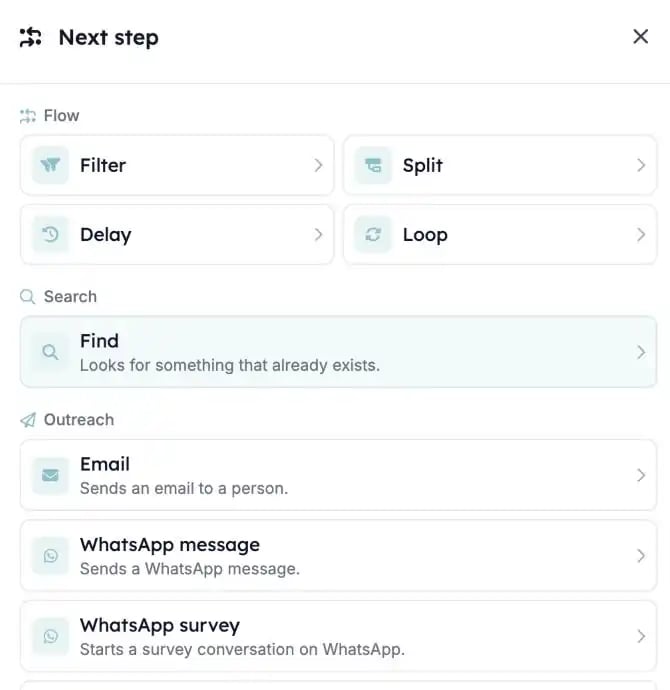
3. New Carerix record steps
On engine 1.3, general steps create, update, delete, archive and restore a Carerix record. You find them in the step drawer under Records (Add, Update) and Lifecycle (Archive, Restore, Delete). They replace the old Carerix steps update field, add note, add task, add email and add publication.4. Steps no longer offered
Find Email, Verify Email, Search Domain, Sync Person and Post Webhook are no longer offered in new automations. Existing steps with these tasks keep running.What else changed?
- The step drawer groups steps into sections: Flow, Search, Outreach, Records, AI and tools, Human in the loop and Lifecycle.
- Prompt is now called Ask AI.
- HTTP request replaces Post Webhook for calling another web service.
- Find has its own page: Look up records with Find. Review steps are explained in Reviews.