

Reviews is available for beta accounts, together with engine 1.3.0. Other accounts can get it one by one: contact your success manager.
Pause a run until someone decides
Add a Review step where the automation should wait. You find it in the step drawer under Human in the loop.1. Choose how the review works
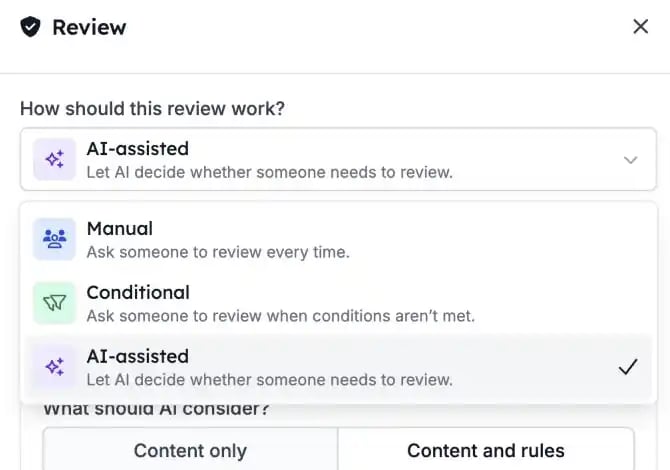
A Review step has three modes:- Manual: a person always reviews. This is the default.
- Conditional: a person reviews only when the conditions you set call for it.
- AI-assisted: AI checks the content against your criteria first, and asks a person when it’s unsure or information is missing.
2. Review from one queue
Open Reviews. For you shows the requests assigned to you. Admins also see All, and can reassign a request to someone else. Filter by Pending, Approved or Rejected. Select a request to see the content, the criteria, and links to the automation and the run.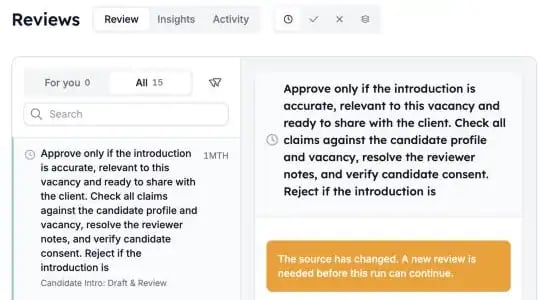
3. Approve or reject
- Approve: the run continues with the next step.
- Reject: the run stops.
What else to know
- Test runs create reviews you handle in the run itself. They stay out of the regular queue and out of Insights.
- Insights shows request volume and team workload. Activity shows the decision history.
- If an automation changed after a review was requested, an admin can replace the outdated request.